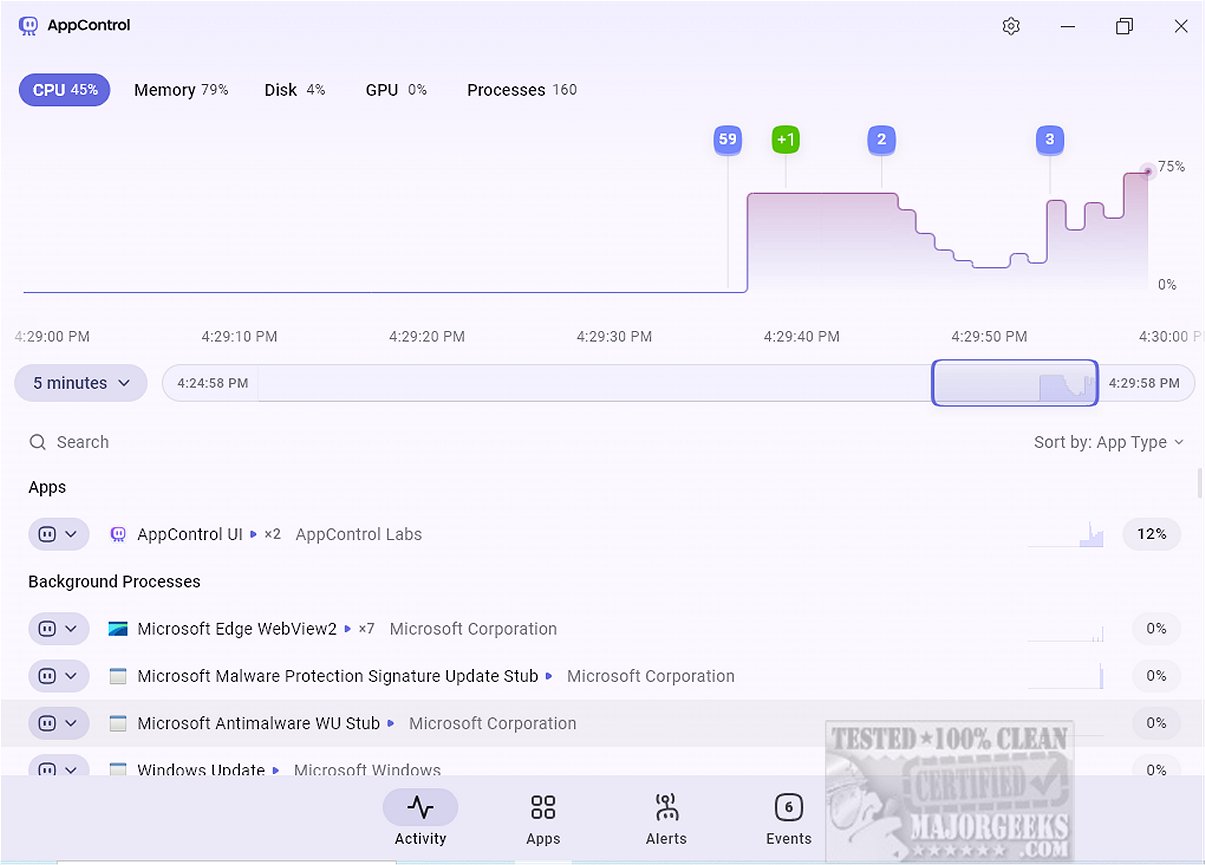
AppControl 1.0.0.145b has been released, introducing a robust system monitoring tool designed to give users an easy and intuitive way to track resource usage over time. This tool serves as a viable alternative to the traditional Task Manager, featuring a historical timeline that presents detailed metrics on CPU, GPU, memory, disk usage, and temperature. By simplifying technical jargon and providing clear descriptions of active processes, AppControl enhances the user experience.
The application boasts a sleek and modern interface that allows seamless navigation through a scrollable timeline, enabling users to investigate resource consumption spikes and understand the factors contributing to them. Users can access a list of running applications, background processes, and Windows processes all in one view. While AppControl does allow for terminating or disabling processes, it currently lacks the ability to suspend individual browser tabs, a feature available in Task Manager. However, its app insights feature provides useful descriptions of processes, reducing the need for users to conduct online research about known Windows applications.
A key highlight of AppControl is its emphasis on privacy-related events. The Apps tab monitors applications and highlights privacy settings concerning hardware access, such as camera, microphone, and location tracking. Users can set custom alerts for important privacy events, like when an application accesses sensitive hardware or activates location tracking. The Events tab further enriches the user experience by offering insights into actions taken by running processes, detailing when applications are launched, updated, or when hardware components are accessed.
Despite its many strengths, AppControl does have some limitations. For example, it does not provide options to restart Windows Explorer or initiate new processes directly, and it also lacks features for displaying running services and startup applications. These omissions could enhance its functionality and overall utility.
Overall, AppControl emerges as a powerful alternative to the conventional Task Manager, offering an array of features that cater to power users. With real-time and historical resource monitoring, customizable alerts, and continuous event tracking, AppControl enables users to gain deeper insights into their system's performance and activities, ensuring better control over their devices. For users who may need assistance, the developer has provided a helpful support section.
In conclusion, AppControl is not just a task manager but a comprehensive monitoring tool that emphasizes user experience, privacy, and resource management. As it continues to evolve, future updates could address its current limitations and further solidify its position as a leading resource management application
The application boasts a sleek and modern interface that allows seamless navigation through a scrollable timeline, enabling users to investigate resource consumption spikes and understand the factors contributing to them. Users can access a list of running applications, background processes, and Windows processes all in one view. While AppControl does allow for terminating or disabling processes, it currently lacks the ability to suspend individual browser tabs, a feature available in Task Manager. However, its app insights feature provides useful descriptions of processes, reducing the need for users to conduct online research about known Windows applications.
A key highlight of AppControl is its emphasis on privacy-related events. The Apps tab monitors applications and highlights privacy settings concerning hardware access, such as camera, microphone, and location tracking. Users can set custom alerts for important privacy events, like when an application accesses sensitive hardware or activates location tracking. The Events tab further enriches the user experience by offering insights into actions taken by running processes, detailing when applications are launched, updated, or when hardware components are accessed.
Despite its many strengths, AppControl does have some limitations. For example, it does not provide options to restart Windows Explorer or initiate new processes directly, and it also lacks features for displaying running services and startup applications. These omissions could enhance its functionality and overall utility.
Overall, AppControl emerges as a powerful alternative to the conventional Task Manager, offering an array of features that cater to power users. With real-time and historical resource monitoring, customizable alerts, and continuous event tracking, AppControl enables users to gain deeper insights into their system's performance and activities, ensuring better control over their devices. For users who may need assistance, the developer has provided a helpful support section.
In conclusion, AppControl is not just a task manager but a comprehensive monitoring tool that emphasizes user experience, privacy, and resource management. As it continues to evolve, future updates could address its current limitations and further solidify its position as a leading resource management application
AppControl 1.0.0.145b released
AppControl offers a comprehensive system monitoring tool that provides users with an intuitive way to track resource usage over time.