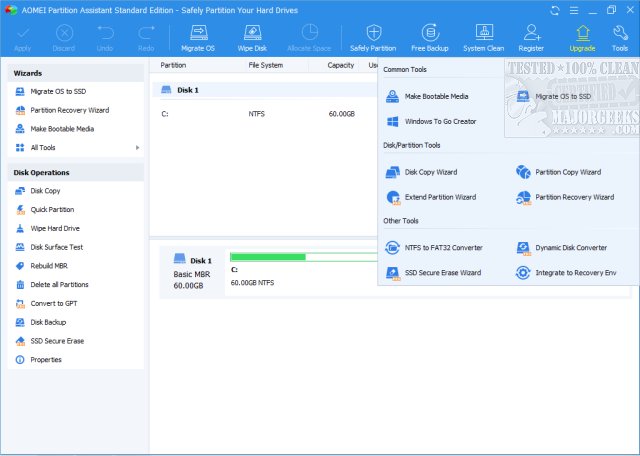
Aomei Partition Assistant 10.10.1 has been released, enhancing its reputation as a comprehensive disk partition solution. This software combines a powerful Partition Manager with a user-friendly one-click Extend Partition Wizard, making it easier than ever for users to manage their hard drives efficiently.
Overview of AOMEI Partition Assistant
AOMEI Partition Assistant is designed for individuals who have experienced the frustrations of running out of disk space or encountering difficulties with partition management. This tool simplifies disk management, allowing users to resize, merge, clone, and convert partitions without the risk of data loss. Unlike Windows' built-in partition manager, which can be limited and cumbersome, AOMEI provides a robust set of features that empower users to take control of their storage solutions.
Key Features
- Resize, Move, Merge, and Split Partitions: Users can easily manage their storage by adjusting partition sizes to optimize disk space, especially useful for freeing up space on the C: drive.
- Convert Between MBR and GPT: AOMEI allows users to switch partition styles effortlessly, crucial for hardware upgrades without the need to erase data.
- Migrate OS to SSD: The software facilitates the transition from a traditional HDD to a faster SSD, enabling users to upgrade their systems without the hassle of reinstalling the operating system.
- Create Bootable Media: In case of boot failure, AOMEI provides the capability to create recovery USBs to resolve partition issues before they escalate.
- Windows To Go Creator: This feature allows users to carry a portable version of their Windows OS on a USB drive, making it especially beneficial for IT professionals and users who travel frequently.
Target Audience
AOMEI Partition Assistant caters to a variety of users, including gamers, IT professionals, and everyday users seeking to maximize their hard drive utilization. Gamers can optimize their storage for better performance, while business professionals and IT admins can manage systems across multiple workstations efficiently. The software's intuitive interface makes it accessible for home users as well, who can easily navigate partition tasks without needing advanced technical knowledge.
Conclusion
For anyone who has ever faced issues with disk space or partition management, AOMEI Partition Assistant offers a reliable and effective solution. Its advanced capabilities, paired with its user-friendly design, make it a must-have tool for anyone eager to manage their storage effectively. With AOMEI, users can tackle complex partition tasks with ease, making it a superior choice compared to Windows’ native tools. Whether upgrading to SSDs, resolving partition issues, or optimizing storage, AOMEI Partition Assistant is a powerful ally in achieving hassle-free disk management.
Additional Resources
- Quick Format and Full Format Explained
- How to Erase a Disk Using Diskpart Clean Command in Windows
- GPT (GUID Partition Table) or MBR (Master Boot Record) When Partitioning a Drive?
As technology continues to evolve, having a dependable and versatile tool like AOMEI Partition Assistant will remain invaluable for effective disk management in both personal and professional contexts
Overview of AOMEI Partition Assistant
AOMEI Partition Assistant is designed for individuals who have experienced the frustrations of running out of disk space or encountering difficulties with partition management. This tool simplifies disk management, allowing users to resize, merge, clone, and convert partitions without the risk of data loss. Unlike Windows' built-in partition manager, which can be limited and cumbersome, AOMEI provides a robust set of features that empower users to take control of their storage solutions.
Key Features
- Resize, Move, Merge, and Split Partitions: Users can easily manage their storage by adjusting partition sizes to optimize disk space, especially useful for freeing up space on the C: drive.
- Convert Between MBR and GPT: AOMEI allows users to switch partition styles effortlessly, crucial for hardware upgrades without the need to erase data.
- Migrate OS to SSD: The software facilitates the transition from a traditional HDD to a faster SSD, enabling users to upgrade their systems without the hassle of reinstalling the operating system.
- Create Bootable Media: In case of boot failure, AOMEI provides the capability to create recovery USBs to resolve partition issues before they escalate.
- Windows To Go Creator: This feature allows users to carry a portable version of their Windows OS on a USB drive, making it especially beneficial for IT professionals and users who travel frequently.
Target Audience
AOMEI Partition Assistant caters to a variety of users, including gamers, IT professionals, and everyday users seeking to maximize their hard drive utilization. Gamers can optimize their storage for better performance, while business professionals and IT admins can manage systems across multiple workstations efficiently. The software's intuitive interface makes it accessible for home users as well, who can easily navigate partition tasks without needing advanced technical knowledge.
Conclusion
For anyone who has ever faced issues with disk space or partition management, AOMEI Partition Assistant offers a reliable and effective solution. Its advanced capabilities, paired with its user-friendly design, make it a must-have tool for anyone eager to manage their storage effectively. With AOMEI, users can tackle complex partition tasks with ease, making it a superior choice compared to Windows’ native tools. Whether upgrading to SSDs, resolving partition issues, or optimizing storage, AOMEI Partition Assistant is a powerful ally in achieving hassle-free disk management.
Additional Resources
- Quick Format and Full Format Explained
- How to Erase a Disk Using Diskpart Clean Command in Windows
- GPT (GUID Partition Table) or MBR (Master Boot Record) When Partitioning a Drive?
As technology continues to evolve, having a dependable and versatile tool like AOMEI Partition Assistant will remain invaluable for effective disk management in both personal and professional contexts
Aomei Partition Assistant 10.10.1 released
Aomei Partition Assistant Standard is a comprehensive disk partition solution, including a Partition Manager and a one-click Extend Partition Wizard.