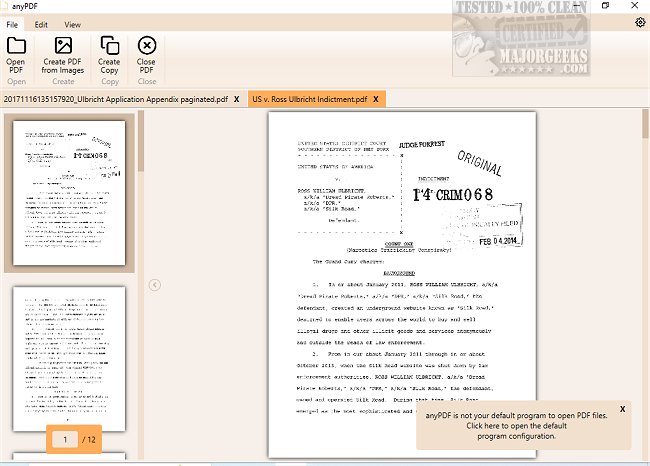
anyPDF 1.5.0.0 has been released, offering users a comprehensive and user-friendly solution for working with PDF documents. As a free application, anyPDF empowers users to edit, convert, secure, and organize their PDF files without the usual limitations.
With this powerful tool, you can easily open and compress PDF files, ensuring they are compact and shareable. It also allows you to clone PDFs, apply password protection to your documents, and access secured PDFs shared by others. Filling out forms is straightforward with anyPDF, making it an essential tool for both personal and professional use.
In addition to these features, anyPDF provides the capability to split or merge PDF files according to your needs, whether you want to consolidate documents or create separate files for individual chapters. Users can highlight pages, export them as PDFs or images, and customize their documents by adding text, images, and highlights to emphasize important information. The app also supports organizing PDFs by enabling users to sort, delete, rotate pages, add blank pages, or import pages from other PDF files.
Overall, anyPDF is designed to enhance your PDF management experience, offering a plethora of tools that cater to various editing and organizational needs. Don’t hesitate to download and explore anyPDF today to take full control of your PDF library at no cost.
In addition to the features mentioned, future updates could potentially include enhanced collaboration tools for sharing PDFs with others, improved OCR (Optical Character Recognition) capabilities for editing scanned documents, and integration with cloud services for easier access to files across devices
With this powerful tool, you can easily open and compress PDF files, ensuring they are compact and shareable. It also allows you to clone PDFs, apply password protection to your documents, and access secured PDFs shared by others. Filling out forms is straightforward with anyPDF, making it an essential tool for both personal and professional use.
In addition to these features, anyPDF provides the capability to split or merge PDF files according to your needs, whether you want to consolidate documents or create separate files for individual chapters. Users can highlight pages, export them as PDFs or images, and customize their documents by adding text, images, and highlights to emphasize important information. The app also supports organizing PDFs by enabling users to sort, delete, rotate pages, add blank pages, or import pages from other PDF files.
Overall, anyPDF is designed to enhance your PDF management experience, offering a plethora of tools that cater to various editing and organizational needs. Don’t hesitate to download and explore anyPDF today to take full control of your PDF library at no cost.
In addition to the features mentioned, future updates could potentially include enhanced collaboration tools for sharing PDFs with others, improved OCR (Optical Character Recognition) capabilities for editing scanned documents, and integration with cloud services for easier access to files across devices
anyPDF 1.5.0.0 released
anyPDF is a free, full-service PDF app that allows you to edit PDF documents through a user-friendly interface.