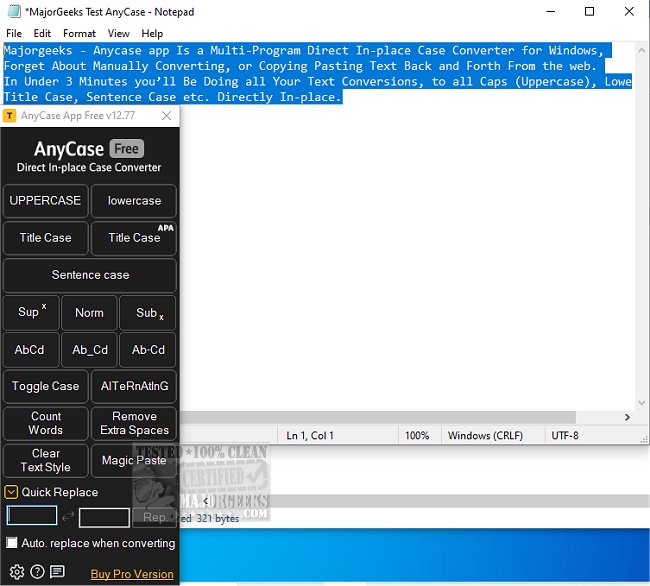
The AnyCase App version 14.41 has been released, offering users a powerful and efficient case conversion tool for Windows. This application streamlines the text conversion process, removing the need for tedious manual adjustments or the hassle of copying and pasting. With AnyCase App, users can effortlessly convert text into various formats, including All Caps (Uppercase), lowercase, Title Case, and Sentence Case.
Upon launching AnyCase App, users are greeted with an intuitive user interface that provides access to text conversion options and customizable settings. For example, to convert text from UPPERCASE to lowercase, simply select the desired text and choose the appropriate option from the menu. This versatile tool is compatible with major web browsers such as Google Chrome, Mozilla Firefox, Opera, Microsoft Edge, Internet Explorer, and Vivaldi, without requiring any extensions or add-ons. Users can check the author’s website for a comprehensive list of supported applications.
One of the standout features of AnyCase App is its lightning-fast performance, allowing text conversions to occur in mere seconds. Additionally, it offers a right-click context menu across all supported programs, facilitating quick capitalization adjustments without interrupting workflow. Global shortcuts can also be customized, enabling users to define their key combinations for speedy text transformations.
Furthermore, AnyCase App supports converting text to Superscript or Subscript directly within any application, making it particularly useful for scientific or mathematical notations. Users can even set custom shortcuts for these conversions, enhancing efficiency.
Another practical feature is the ability to replace specific characters or words in real-time. For instance, if a user needs to replace spaces with hyphens or underscores in multiple files, this can be done seamlessly and repeatedly as needed.
The Custom Word Capitalization feature further enhances the app's functionality by allowing users to specify how certain words should be capitalized consistently. This ensures brand names or frequently used terms—like capitalizing "majorgeeks" as "MajorGeeks"—are formatted correctly every time during Sentence Case or Title Case conversions.
AnyCase App is an invaluable tool for anyone involved in writing or text editing, significantly reducing time spent on manual formatting. With its array of features and user-friendly design, it promises to be an essential asset in any writer's toolkit.
Moreover, incorporating voice recognition technology could allow users to dictate text that needs formatting, further simplifying the process for those who prefer speaking over typing.
An AI-powered suggestion engine could also be a beneficial addition, where the app analyzes commonly used phrases and offers automatic capitalization or formatting options based on user habits, streamlining the writing process even further.
Finally, a mobile version of AnyCase App could extend its reach, allowing users to convert text on their smartphones or tablets, which would be particularly useful for professionals on the go. These features could make AnyCase App not just a tool for desktop users but a comprehensive solution for all text formatting needs across various devices and platforms
Upon launching AnyCase App, users are greeted with an intuitive user interface that provides access to text conversion options and customizable settings. For example, to convert text from UPPERCASE to lowercase, simply select the desired text and choose the appropriate option from the menu. This versatile tool is compatible with major web browsers such as Google Chrome, Mozilla Firefox, Opera, Microsoft Edge, Internet Explorer, and Vivaldi, without requiring any extensions or add-ons. Users can check the author’s website for a comprehensive list of supported applications.
One of the standout features of AnyCase App is its lightning-fast performance, allowing text conversions to occur in mere seconds. Additionally, it offers a right-click context menu across all supported programs, facilitating quick capitalization adjustments without interrupting workflow. Global shortcuts can also be customized, enabling users to define their key combinations for speedy text transformations.
Furthermore, AnyCase App supports converting text to Superscript or Subscript directly within any application, making it particularly useful for scientific or mathematical notations. Users can even set custom shortcuts for these conversions, enhancing efficiency.
Another practical feature is the ability to replace specific characters or words in real-time. For instance, if a user needs to replace spaces with hyphens or underscores in multiple files, this can be done seamlessly and repeatedly as needed.
The Custom Word Capitalization feature further enhances the app's functionality by allowing users to specify how certain words should be capitalized consistently. This ensures brand names or frequently used terms—like capitalizing "majorgeeks" as "MajorGeeks"—are formatted correctly every time during Sentence Case or Title Case conversions.
AnyCase App is an invaluable tool for anyone involved in writing or text editing, significantly reducing time spent on manual formatting. With its array of features and user-friendly design, it promises to be an essential asset in any writer's toolkit.
Extension
In addition to the existing features, future updates of AnyCase App could include enhanced integration with cloud services, enabling users to convert text directly from their cloud storage platforms. This would allow for seamless access to documents stored on services like Google Drive or Dropbox without needing to download files first.Moreover, incorporating voice recognition technology could allow users to dictate text that needs formatting, further simplifying the process for those who prefer speaking over typing.
An AI-powered suggestion engine could also be a beneficial addition, where the app analyzes commonly used phrases and offers automatic capitalization or formatting options based on user habits, streamlining the writing process even further.
Finally, a mobile version of AnyCase App could extend its reach, allowing users to convert text on their smartphones or tablets, which would be particularly useful for professionals on the go. These features could make AnyCase App not just a tool for desktop users but a comprehensive solution for all text formatting needs across various devices and platforms
AnyCase App 14.41 released
AnyCase App is a convenient case converter tool for Windows that saves you time by eliminating the need for manual text conversion or copying and pasting.