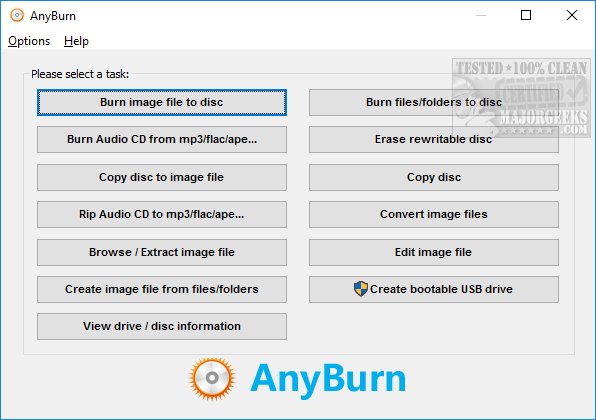
AnyBurn 6.7 has been released, bringing enhancements to this versatile and free application for burning CDs, DVDs, and Blu-rays. With AnyBurn, users can easily create and burn disc images, rip and burn audio files, copy discs, and even create bootable USB drives for Windows installation. The user-friendly interface is designed with side-by-side buttons, streamlining the process for common tasks.
For those who frequently work with image files, AnyBurn offers a comprehensive suite of features, including burning, copying, browsing, extracting, creating, converting, and editing image files. The software supports various audio formats for ripping CDs, such as MP3, FLAC, APE, and WMA, allowing users to produce audio CDs compatible with standard CD and DVD players. When creating bootable USB drives, it’s important to run the application with administrative privileges.
AnyBurn is equipped with additional options to help mitigate errors during the burning process, which can often lead to wasted discs. Options like data verification, disc finalization, and adjustable burning speeds are crucial for ensuring successful burns. When handling image files, users can access settings related to file systems, ISO9660 names, Joliet names, and file optimization.
Moreover, AnyBurn supports multiple languages, enhancing accessibility for users worldwide. It allows customization of various settings, including buffer size, disc ejection post-burn, and drag-and-drop functionalities, catering to individual preferences. Overall, AnyBurn stands out as a lightweight, easy-to-use, and feature-rich tool for anyone in need of disc burning solutions.
Extension:
The release of AnyBurn 6.7 not only improves usability but also emphasizes the importance of reliable disc burning technology in today's digital age. While many users have shifted towards digital storage, there remains a significant demand for physical media, especially in archival purposes and for use in older devices. This update could also signal potential future developments, such as support for newer disc formats or enhanced cloud integration.
Furthermore, as digital rights management and security become increasingly vital, it would be interesting to see if AnyBurn introduces features that help users manage their media legally and securely. The application could also expand its capabilities to include advanced disc encryption or support for high-capacity storage solutions like BDXL.
As technology continues to evolve, the relevance of tools like AnyBurn remains strong, and updates like version 6.7 highlight the ongoing need to adapt to user demands while ensuring that foundational functionalities remain robust and reliable
For those who frequently work with image files, AnyBurn offers a comprehensive suite of features, including burning, copying, browsing, extracting, creating, converting, and editing image files. The software supports various audio formats for ripping CDs, such as MP3, FLAC, APE, and WMA, allowing users to produce audio CDs compatible with standard CD and DVD players. When creating bootable USB drives, it’s important to run the application with administrative privileges.
AnyBurn is equipped with additional options to help mitigate errors during the burning process, which can often lead to wasted discs. Options like data verification, disc finalization, and adjustable burning speeds are crucial for ensuring successful burns. When handling image files, users can access settings related to file systems, ISO9660 names, Joliet names, and file optimization.
Moreover, AnyBurn supports multiple languages, enhancing accessibility for users worldwide. It allows customization of various settings, including buffer size, disc ejection post-burn, and drag-and-drop functionalities, catering to individual preferences. Overall, AnyBurn stands out as a lightweight, easy-to-use, and feature-rich tool for anyone in need of disc burning solutions.
Extension:
The release of AnyBurn 6.7 not only improves usability but also emphasizes the importance of reliable disc burning technology in today's digital age. While many users have shifted towards digital storage, there remains a significant demand for physical media, especially in archival purposes and for use in older devices. This update could also signal potential future developments, such as support for newer disc formats or enhanced cloud integration.
Furthermore, as digital rights management and security become increasingly vital, it would be interesting to see if AnyBurn introduces features that help users manage their media legally and securely. The application could also expand its capabilities to include advanced disc encryption or support for high-capacity storage solutions like BDXL.
As technology continues to evolve, the relevance of tools like AnyBurn remains strong, and updates like version 6.7 highlight the ongoing need to adapt to user demands while ensuring that foundational functionalities remain robust and reliable
AnyBurn 6.7 released
AnyBurn is a free CD, DVD, and Blu-ray burning app that can create and burn images, rip and burn audio, copy discs, create a bootable Windows USB, and more.