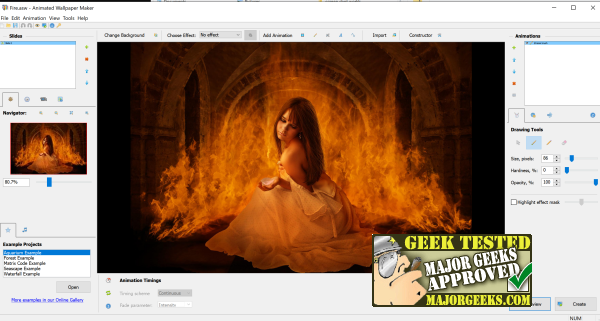
Animated Wallpaper Maker version 4.5.47 has been released, offering users the ability to transform their desktop backgrounds into dynamic animated displays. This software is perfect for those looking to enhance their desktop experience with just a few clicks. Users can start by utilizing a variety of predefined project files or can create their animations from scratch by loading any preferred image.
The process is simple: once an image is uploaded, users can easily incorporate animations from a vast library of examples by clicking the plus icon next to the animation window. The software also allows for customization through features like fading, shaping, and even sound integration (with support for .wav files). After creating an animated masterpiece, users can save their project, set it as their current wallpaper, or export it as an .exe file for later use. This .exe file will run the Animated Wallpaper Maker program and minimize to the system tray, allowing users to manage their animated backgrounds easily.
Although the price of $39.77 may seem steep at first, many users find great enjoyment in experimenting with the software and enhancing their desktop aesthetics, making it a worthwhile investment.
In addition to the features of Animated Wallpaper Maker, there's also a collection available on MajorGeeks that includes unique and eerie wallpapers for users who enjoy a spooky touch on their desktops.
For those interested in more desktop customization options, there are guides on how to maintain fresh backgrounds with desktop slideshows and how to change Windows 10 & 11 wallpapers without activation, as well as instructions for deleting desktop wallpaper history in these versions of Windows.
Overall, Animated Wallpaper Maker provides a fun and creative way to personalize your desktop environment, encouraging users to explore their artistic side while enhancing their computing experience
The process is simple: once an image is uploaded, users can easily incorporate animations from a vast library of examples by clicking the plus icon next to the animation window. The software also allows for customization through features like fading, shaping, and even sound integration (with support for .wav files). After creating an animated masterpiece, users can save their project, set it as their current wallpaper, or export it as an .exe file for later use. This .exe file will run the Animated Wallpaper Maker program and minimize to the system tray, allowing users to manage their animated backgrounds easily.
Although the price of $39.77 may seem steep at first, many users find great enjoyment in experimenting with the software and enhancing their desktop aesthetics, making it a worthwhile investment.
In addition to the features of Animated Wallpaper Maker, there's also a collection available on MajorGeeks that includes unique and eerie wallpapers for users who enjoy a spooky touch on their desktops.
For those interested in more desktop customization options, there are guides on how to maintain fresh backgrounds with desktop slideshows and how to change Windows 10 & 11 wallpapers without activation, as well as instructions for deleting desktop wallpaper history in these versions of Windows.
Overall, Animated Wallpaper Maker provides a fun and creative way to personalize your desktop environment, encouraging users to explore their artistic side while enhancing their computing experience
Animated Wallpaper Maker 4.5.47 released
Animated Wallpaper Maker can turn any desktop background into an animated masterpiece.