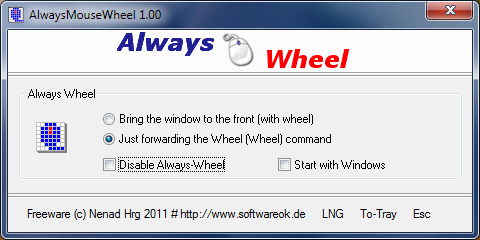
AlwaysMouseWheel has released version 6.56, enhancing user experience by allowing seamless scrolling with the mouse wheel across any open windows, regardless of whether they are in the foreground or background. This tool offers a range of features that improve functionality, including:
- Bringing a specific window to the foreground when scrolling.
- Sending scroll commands to background windows, which is particularly useful for multitasking.
- The ability to move windows by dragging with the [Alt + left mouse button].
- Resizing windows using the [Alt + right mouse button].
- Controlling volume directly from the taskbar by scrolling the mouse wheel.
In addition to these features, users may find other similar tools beneficial, such as options for changing double-click actions to single-click for opening files and folders, enabling mouse pointer trails, and adjusting settings for pointer precision. Troubleshooting tools are also available for addressing common mouse issues like slow or lagging performance.
As AlwaysMouseWheel continues to evolve, it may incorporate additional features and enhancements to further streamline user interactions and improve productivity across various tasks. The growing demand for efficient multitasking tools in today's fast-paced digital environment highlights the importance of applications like AlwaysMouseWheel, which aim to optimize user experience by simplifying window management and navigation
- Bringing a specific window to the foreground when scrolling.
- Sending scroll commands to background windows, which is particularly useful for multitasking.
- The ability to move windows by dragging with the [Alt + left mouse button].
- Resizing windows using the [Alt + right mouse button].
- Controlling volume directly from the taskbar by scrolling the mouse wheel.
In addition to these features, users may find other similar tools beneficial, such as options for changing double-click actions to single-click for opening files and folders, enabling mouse pointer trails, and adjusting settings for pointer precision. Troubleshooting tools are also available for addressing common mouse issues like slow or lagging performance.
As AlwaysMouseWheel continues to evolve, it may incorporate additional features and enhancements to further streamline user interactions and improve productivity across various tasks. The growing demand for efficient multitasking tools in today's fast-paced digital environment highlights the importance of applications like AlwaysMouseWheel, which aim to optimize user experience by simplifying window management and navigation
AlwaysMouseWheel 6.56 released
AlwaysMouseWheel allows you to use the mouse wheel for scrolling over any windows, even if that window is not in the foreground.