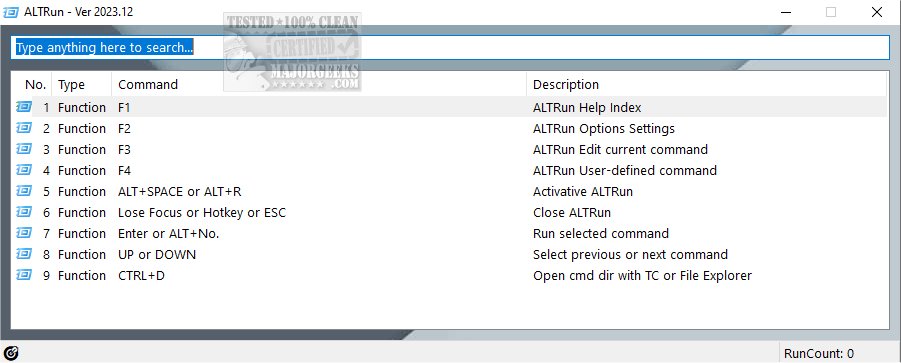
ALTRun, an innovative open-source launcher developed using AutoHotkey, has been updated to version 2026.01.15. This powerful tool is designed to enhance your productivity by allowing you to quickly locate and access files, applications, and directories on your Windows system. With its intuitive and customizable user interface, users can modify various settings including the number of columns displayed, font size, window dimensions, and background images. Additionally, the option to hide the title bar further enhances the minimalist design, making it more appealing and user-friendly.
The options menu of ALTRun is packed with features that cater to diverse work styles. For instance, users can set the application to always remain on top of other windows or create a personalized SendTo menu for quicker access to frequently used items. One of the standout features of ALTRun is its integration with the Listary Quick Switch Dir function, which simplifies file and directory management. This feature is particularly beneficial for users who frequently navigate through multiple directories, allowing for swift transitions and improved organization.
ALTRun not only boosts efficiency in file management but also serves as a versatile tool for task automation. Built on the AutoHotkey platform, users can seamlessly integrate ALTRun with custom scripts, enhancing its capabilities according to individual needs. The AutoHotkey menu, accessible from the System Tray, allows users to modify the default script, providing a significant level of customization.
Some notable features of ALTRun include:
- Fully portable software, requiring no installation
- Extensive customization options for the GUI (Main Window, Options, Command Manager)
- Automatic adjustment of command rank priority based on usage frequency
- Integration of the Listary Quick Switch Dir function for streamlined navigation
- The AppControl function for managing application interactions
In summary, ALTRun is a robust tool that not only simplifies file management but also empowers users to tailor their workflows. Its combination of portability, customization, and integration with AutoHotkey makes it a valuable asset for anyone looking to enhance their productivity on Windows. As ALTRun continues to evolve, users can expect further improvements and features that respond to their needs, making it an essential tool in the realm of digital organization and task management
The options menu of ALTRun is packed with features that cater to diverse work styles. For instance, users can set the application to always remain on top of other windows or create a personalized SendTo menu for quicker access to frequently used items. One of the standout features of ALTRun is its integration with the Listary Quick Switch Dir function, which simplifies file and directory management. This feature is particularly beneficial for users who frequently navigate through multiple directories, allowing for swift transitions and improved organization.
ALTRun not only boosts efficiency in file management but also serves as a versatile tool for task automation. Built on the AutoHotkey platform, users can seamlessly integrate ALTRun with custom scripts, enhancing its capabilities according to individual needs. The AutoHotkey menu, accessible from the System Tray, allows users to modify the default script, providing a significant level of customization.
Some notable features of ALTRun include:
- Fully portable software, requiring no installation
- Extensive customization options for the GUI (Main Window, Options, Command Manager)
- Automatic adjustment of command rank priority based on usage frequency
- Integration of the Listary Quick Switch Dir function for streamlined navigation
- The AppControl function for managing application interactions
In summary, ALTRun is a robust tool that not only simplifies file management but also empowers users to tailor their workflows. Its combination of portability, customization, and integration with AutoHotkey makes it a valuable asset for anyone looking to enhance their productivity on Windows. As ALTRun continues to evolve, users can expect further improvements and features that respond to their needs, making it an essential tool in the realm of digital organization and task management
ALTRun 2026.01.15 released
ALTRun is an Open Source Launcher for Windows built utilizing AutoHotkey.