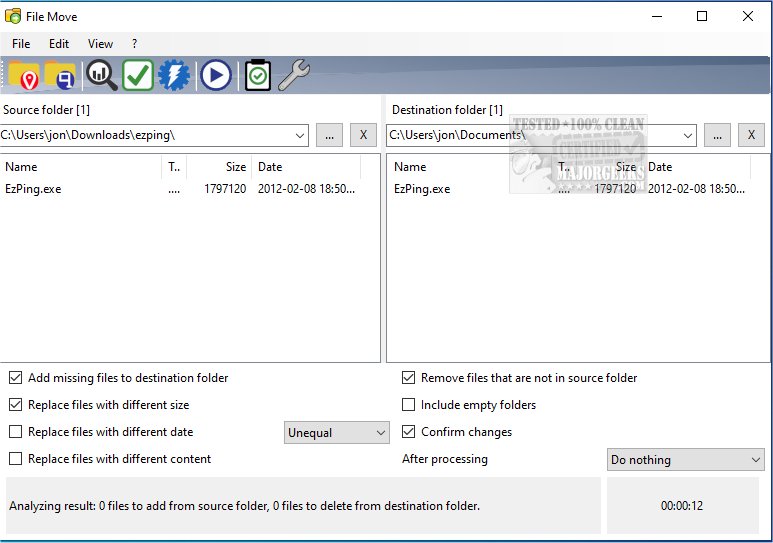
The latest version of Alternate File Move, version 2.630, has been released, offering users a range of free features designed to simplify the synchronization of contents between two folders. This tool allows users to compare the files in two specific directories, ensuring that the data is consistent before transferring it from one location to another.
In addition to its core functionality, users can benefit from resources that enhance their file management skills, such as guides on resetting folder view settings in Windows 10 and 11, a comprehensive list of keyboard shortcuts for File Explorer, methods for restarting File Explorer without needing to reboot the system, and tips for displaying the actual path in File Explorer.
To further extend the capabilities of Alternate File Move, users might consider integrating this tool with cloud storage solutions, enabling seamless synchronization across devices. Additionally, exploring automation features could streamline repetitive tasks, allowing users to set schedules for regular folder comparisons and updates, thereby enhancing productivity and data integrity over time
In addition to its core functionality, users can benefit from resources that enhance their file management skills, such as guides on resetting folder view settings in Windows 10 and 11, a comprehensive list of keyboard shortcuts for File Explorer, methods for restarting File Explorer without needing to reboot the system, and tips for displaying the actual path in File Explorer.
To further extend the capabilities of Alternate File Move, users might consider integrating this tool with cloud storage solutions, enabling seamless synchronization across devices. Additionally, exploring automation features could streamline repetitive tasks, allowing users to set schedules for regular folder comparisons and updates, thereby enhancing productivity and data integrity over time
Alternate File Move 2.630 released
Alternate File Move provides several free options enabling you to easily sync the folder contents of two folders.