AlienFx Tools has recently released version 9.4.0, a robust software suite designed to provide Alienware users with enhanced control over various aspects of their systems. This suite includes features that allow users to manage system lights, fan settings, and power configurations efficiently.
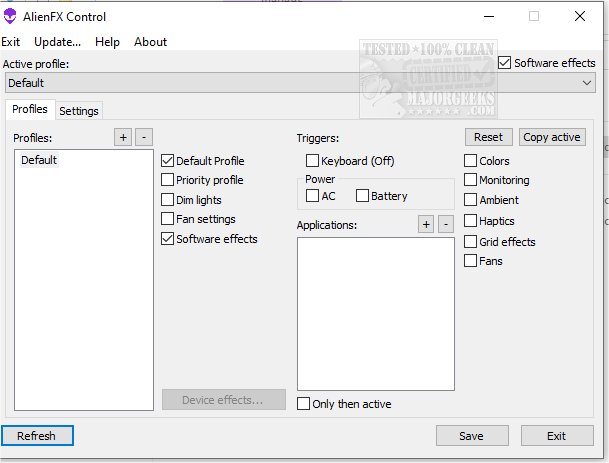
If an Alienware machine is facing issues such as excessive noise or overheating, AlienFX Tools assists users in diagnosing these problems. The suite includes the AlienFan tool which enables advanced fan configuration, letting users customize fan parameters and power modes according to their needs. The Control menu offers the ability to manage different profiles, allowing users to switch seamlessly between operating modes and assign specific profiles to various applications or triggers.
For temperature monitoring, the AlienFX Monitor provides access to data from system temperature sensors, allowing users to select which sensors to display and monitor key hardware temperatures directly from their tray. Notably, AlienFX Tools eliminates the need for AWCC (Alienware Command Center), offering lightweight alternatives to manage system lights, fans, and power profiles effectively.
The suite includes several specialized tools:
- AlienFX Control: A 500KB alternative to AWCC, allowing control over system lights, fans, temperature monitoring, and power settings.
- AlienFX Monitor: A system health monitoring tool that displays important parameters in the tray.
- AlienFX-CLI: A command-line interface tool for managing AlienFX lights.
- LightFX: An emulator for Dell's LightFX library, compatible with any LightFX/AlienFX-compatible game.
- AlienFan GUI control: A user-friendly utility for fan and power management based on system temperature sensors.
- AlienFan-CLI: A command-line tool for fan and light control, as well as power settings.
- AlienFX-Config: A script for backing up, restoring, or deleting tool configurations from the registry.
For beginners, the developer has provided a detailed guide to assist users in getting started with the new tools.
In summary, AlienFx Tools 9.4.0 offers a comprehensive set of features that enhance the user experience for Alienware owners by providing greater control over system performance, temperature management, and customization options. The tools are designed to be lightweight and efficient, making it easier for users to optimize their systems without the complexity of larger software packages
If an Alienware machine is facing issues such as excessive noise or overheating, AlienFX Tools assists users in diagnosing these problems. The suite includes the AlienFan tool which enables advanced fan configuration, letting users customize fan parameters and power modes according to their needs. The Control menu offers the ability to manage different profiles, allowing users to switch seamlessly between operating modes and assign specific profiles to various applications or triggers.
For temperature monitoring, the AlienFX Monitor provides access to data from system temperature sensors, allowing users to select which sensors to display and monitor key hardware temperatures directly from their tray. Notably, AlienFX Tools eliminates the need for AWCC (Alienware Command Center), offering lightweight alternatives to manage system lights, fans, and power profiles effectively.
The suite includes several specialized tools:
- AlienFX Control: A 500KB alternative to AWCC, allowing control over system lights, fans, temperature monitoring, and power settings.
- AlienFX Monitor: A system health monitoring tool that displays important parameters in the tray.
- AlienFX-CLI: A command-line interface tool for managing AlienFX lights.
- LightFX: An emulator for Dell's LightFX library, compatible with any LightFX/AlienFX-compatible game.
- AlienFan GUI control: A user-friendly utility for fan and power management based on system temperature sensors.
- AlienFan-CLI: A command-line tool for fan and light control, as well as power settings.
- AlienFX-Config: A script for backing up, restoring, or deleting tool configurations from the registry.
For beginners, the developer has provided a detailed guide to assist users in getting started with the new tools.
In summary, AlienFx Tools 9.4.0 offers a comprehensive set of features that enhance the user experience for Alienware owners by providing greater control over system performance, temperature management, and customization options. The tools are designed to be lightweight and efficient, making it easier for users to optimize their systems without the complexity of larger software packages
AlienFx Tools 9.4.0 released
AlienFX Tools is a comprehensive suite that aims to provide Alienware owners with enhanced control over their machines; it offers various features that enable you to easily manage your system's lights, fans, and power settings.