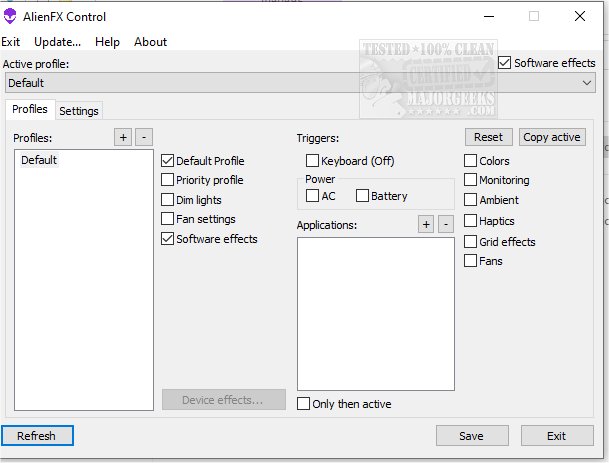
The latest version of AlienFX Tools, 9.3.4.6, has been launched, offering a robust suite designed to provide Alienware users with enhanced control over their devices. This suite includes functionalities to manage system lights, fans, and power settings, catering to the specific needs of Alienware owners.
If users encounter issues related to excessive noise or overheating, AlienFX Tools can help diagnose and address these problems. The suite features the AlienFan tool for advanced fan configuration, allowing users to customize fan parameters and power modes based on their preferences.
Additionally, the Control menu offers a convenient way to manage profiles, permitting users to switch between different operating modes effortlessly. Users can also assign specific profiles to individual applications or set triggers to automate these changes. For temperature monitoring, the AlienFX Monitor provides access to data from temperature sensors, enabling users to select which sensors to monitor and display relevant hardware temperatures in the system tray.
One of the significant updates is that the Alienware Command Center (AWCC) is no longer necessary, as the suite offers lightweight alternatives for managing lights, fans, and power profiles. The following tools are included:
- AlienFX Control: A compact (500 KB) alternative to AWCC for controlling system lights, fan settings, temperatures, and power configurations.
- AlienFX Monitor: A system health monitoring tool that displays critical parameters in the system tray.
- AlienFX-CLI: A command-line interface tool for managing and checking the status of AlienFX lights.
- LightFX: An emulator for the Dell LightFX library, compatible with any LightFX/AlienFX-compatible game.
- AlienFan GUI Control: A user-friendly utility for regulating fan and power settings based on system temperature sensors.
- AlienFan-CLI: A command-line tool for managing fan and light settings, as well as certain power configurations.
- AlienFX-Config: A script that facilitates the backup, restoration, or deletion of tool configurations from the registry.
To assist users in navigating these tools, the developer offers a detailed beginner's guide to get started effectively.
Extension: Future Enhancements and Community Engagement
Looking ahead, the developer plans to introduce further enhancements to AlienFX Tools, including a more intuitive user interface and additional customization options for advanced users. Future updates may also integrate community feedback to address specific user needs and preferences.
Moreover, the developers encourage community engagement by creating forums and online spaces where users can share their configurations, tips, and tricks. This community-driven approach aims to foster collaboration among Alienware owners, enabling them to maximize the capabilities of their systems.
In summary, AlienFX Tools 9.3.4.6 represents a significant advancement for Alienware users, providing essential tools for system management while paving the way for future improvements and community involvement
If users encounter issues related to excessive noise or overheating, AlienFX Tools can help diagnose and address these problems. The suite features the AlienFan tool for advanced fan configuration, allowing users to customize fan parameters and power modes based on their preferences.
Additionally, the Control menu offers a convenient way to manage profiles, permitting users to switch between different operating modes effortlessly. Users can also assign specific profiles to individual applications or set triggers to automate these changes. For temperature monitoring, the AlienFX Monitor provides access to data from temperature sensors, enabling users to select which sensors to monitor and display relevant hardware temperatures in the system tray.
One of the significant updates is that the Alienware Command Center (AWCC) is no longer necessary, as the suite offers lightweight alternatives for managing lights, fans, and power profiles. The following tools are included:
- AlienFX Control: A compact (500 KB) alternative to AWCC for controlling system lights, fan settings, temperatures, and power configurations.
- AlienFX Monitor: A system health monitoring tool that displays critical parameters in the system tray.
- AlienFX-CLI: A command-line interface tool for managing and checking the status of AlienFX lights.
- LightFX: An emulator for the Dell LightFX library, compatible with any LightFX/AlienFX-compatible game.
- AlienFan GUI Control: A user-friendly utility for regulating fan and power settings based on system temperature sensors.
- AlienFan-CLI: A command-line tool for managing fan and light settings, as well as certain power configurations.
- AlienFX-Config: A script that facilitates the backup, restoration, or deletion of tool configurations from the registry.
To assist users in navigating these tools, the developer offers a detailed beginner's guide to get started effectively.
Extension: Future Enhancements and Community Engagement
Looking ahead, the developer plans to introduce further enhancements to AlienFX Tools, including a more intuitive user interface and additional customization options for advanced users. Future updates may also integrate community feedback to address specific user needs and preferences.
Moreover, the developers encourage community engagement by creating forums and online spaces where users can share their configurations, tips, and tricks. This community-driven approach aims to foster collaboration among Alienware owners, enabling them to maximize the capabilities of their systems.
In summary, AlienFX Tools 9.3.4.6 represents a significant advancement for Alienware users, providing essential tools for system management while paving the way for future improvements and community involvement
AlienFx Tools 9.3.4.6 released
AlienFX Tools is a comprehensive suite that aims to provide Alienware owners with enhanced control over their machines; it offers various features that enable you to easily manage your system's lights, fans, and power settings.