AlienFx Tools has launched version 9.3.4.4, a powerful suite designed specifically for Alienware users to enhance their control over various system functionalities. This version offers a multitude of features that facilitate the management of lights, fans, and power settings on compatible Alienware machines.
If your system is plagued with issues such as excessive noise or overheating, AlienFx Tools can be invaluable in diagnosing and addressing these concerns. The suite includes the AlienFan tool, which allows for advanced fan configuration, enabling users to customize fan parameters and power modes tailored to their preferences.
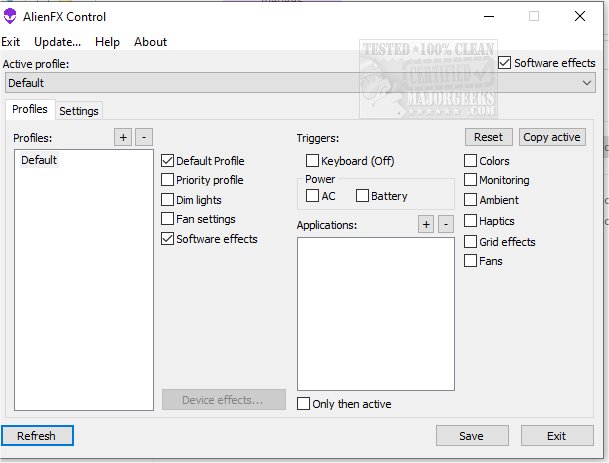
One of the standout features of AlienFx Tools is the Control menu, which allows users to manage profiles effortlessly. This means you can switch between different operating modes based on your current tasks or allocate specific profiles to particular applications or triggers, optimizing performance and efficiency.
To keep an eye on system temperatures, the AlienFX Monitor provides access to data from various temperature sensors. Users can choose which sensors to monitor and display specific hardware temperatures in the system tray for easy access.
Unlike previous iterations that required the Alienware Command Center (AWCC), this new suite offers lightweight alternatives focused on lights, fans, and power profile control. The included tools are:
- AlienFX Control: A compact 500 KB alternative to AWCC for controlling system lights (both hardware and software effects), fans, temperatures, and power settings.
- AlienFX Monitor: A system monitoring tool to check system health and display critical parameters.
- AlienFX-CLI: A command-line interface for adjusting and checking the status of AlienFX lights.
- LightFX: An emulator for the Dell LightFX library, compatible with all Dell API functions and can be used for any LightFX/AlienFX-compatible game.
- AlienFan GUI Control: A simple utility for fan and power control that allows users to set fan parameters based on system temperature sensors.
- AlienFan-CLI: A command-line tool for controlling fans and lights, along with some power settings.
- AlienFX-Config: A script for backing up, restoring, or deleting tool configurations from the registry.
For those new to the suite, the developer provides a detailed beginner’s guide to assist users in getting started with the various features and tools available. This comprehensive suite aims to empower Alienware users by providing them with the necessary tools to optimize their gaming and computing experience.
In addition to the current suite, future updates could potentially expand the functionality of these tools, integrating even more advanced features for system diagnostics, customization, and performance enhancement tailored to the evolving needs of gamers and tech enthusiasts alike
If your system is plagued with issues such as excessive noise or overheating, AlienFx Tools can be invaluable in diagnosing and addressing these concerns. The suite includes the AlienFan tool, which allows for advanced fan configuration, enabling users to customize fan parameters and power modes tailored to their preferences.
One of the standout features of AlienFx Tools is the Control menu, which allows users to manage profiles effortlessly. This means you can switch between different operating modes based on your current tasks or allocate specific profiles to particular applications or triggers, optimizing performance and efficiency.
To keep an eye on system temperatures, the AlienFX Monitor provides access to data from various temperature sensors. Users can choose which sensors to monitor and display specific hardware temperatures in the system tray for easy access.
Unlike previous iterations that required the Alienware Command Center (AWCC), this new suite offers lightweight alternatives focused on lights, fans, and power profile control. The included tools are:
- AlienFX Control: A compact 500 KB alternative to AWCC for controlling system lights (both hardware and software effects), fans, temperatures, and power settings.
- AlienFX Monitor: A system monitoring tool to check system health and display critical parameters.
- AlienFX-CLI: A command-line interface for adjusting and checking the status of AlienFX lights.
- LightFX: An emulator for the Dell LightFX library, compatible with all Dell API functions and can be used for any LightFX/AlienFX-compatible game.
- AlienFan GUI Control: A simple utility for fan and power control that allows users to set fan parameters based on system temperature sensors.
- AlienFan-CLI: A command-line tool for controlling fans and lights, along with some power settings.
- AlienFX-Config: A script for backing up, restoring, or deleting tool configurations from the registry.
For those new to the suite, the developer provides a detailed beginner’s guide to assist users in getting started with the various features and tools available. This comprehensive suite aims to empower Alienware users by providing them with the necessary tools to optimize their gaming and computing experience.
In addition to the current suite, future updates could potentially expand the functionality of these tools, integrating even more advanced features for system diagnostics, customization, and performance enhancement tailored to the evolving needs of gamers and tech enthusiasts alike
AlienFx Tools 9.3.4.4 released
AlienFX Tools is a comprehensive suite that aims to provide Alienware owners with enhanced control over their machines; it offers various features that enable you to easily manage your system's lights, fans, and power settings.