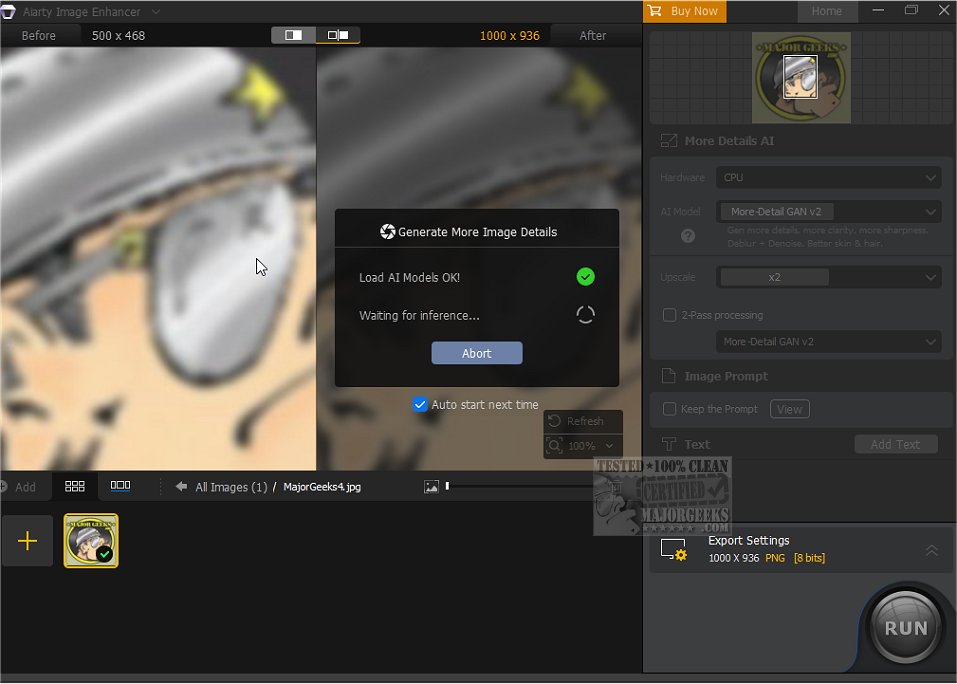
The latest version of Aiarty Image Enhancer, 3.7, leverages cutting-edge artificial intelligence technology to elevate the quality of images with remarkable precision. This powerful software is designed to enhance and upscale images, ensuring near-perfect results that meet the demands of both casual users and professionals alike.
Comprehensive Features for Image Enhancement
Aiarty Image Enhancer is equipped with a suite of sophisticated features that allow users to efficiently remove noise, reduce blur, increase resolution, and enhance details in their images. Its user-friendly interface makes it accessible for everyone, enabling users to transform their visuals effortlessly. The software is particularly adept at utilizing advanced deep learning techniques, which ensure that while image resolution is increased, the original details are preserved.
Exceptional Resolution Support
One of the standout features of Aiarty Image Enhancer is its support for ultra-high resolutions. Users can upscale images to an impressive 32K resolution on Windows, or 16K resolution on Mac, making it an ideal tool for preparing images for printing and high-quality displays. Whether you need to enhance low-resolution images or restore compressed JPEGs, this software can significantly improve image quality.
Versatile Applications
Aiarty Image Enhancer is not limited to just photographs; it excels in enhancing various types of visual content, including AI-generated artwork, anime, illustrations, and web images, even those compressed by online platforms. The software offers tailored enhancement models to suit different types of images, ensuring optimal results.
Diverse AI Models for Tailored Enhancement
The software includes three specialized AI models:
1. More-detail GAN: Focuses on generating intricate details, particularly effective for enhancing skin, hair, and other fine textures.
2. Smooth Diff: Aims to restore original image fidelity, ideal for 2D art, faces, and smooth textures like glass and line art.
3. Real-Photo: Enhances real photographs with photorealistic details, perfect for family portraits, product photography, and scenic landscapes.
User-Friendly Enhancement Process
Using Aiarty Image Enhancer is straightforward. Users can select from various enhancement models, choose the desired upscale factor (ranging from 2K to 32K), and let the AI perform its magic. This simplicity allows users to achieve stunning results without needing extensive technical knowledge.
Conclusion
For those seeking a powerful image enhancement solution, Aiarty Image Enhancer 3.7 is a must-try. This innovative software promises to transform your images, adding new dimensions of detail and clarity. With its advanced AI capabilities and versatile application options, Aiarty Image Enhancer stands out as a premier tool for anyone serious about image quality.
In addition to the enhancement capabilities, users may also find useful guides on related topics, such as viewing images in slideshow format on Windows or restoring the Windows Photo Viewer
Comprehensive Features for Image Enhancement
Aiarty Image Enhancer is equipped with a suite of sophisticated features that allow users to efficiently remove noise, reduce blur, increase resolution, and enhance details in their images. Its user-friendly interface makes it accessible for everyone, enabling users to transform their visuals effortlessly. The software is particularly adept at utilizing advanced deep learning techniques, which ensure that while image resolution is increased, the original details are preserved.
Exceptional Resolution Support
One of the standout features of Aiarty Image Enhancer is its support for ultra-high resolutions. Users can upscale images to an impressive 32K resolution on Windows, or 16K resolution on Mac, making it an ideal tool for preparing images for printing and high-quality displays. Whether you need to enhance low-resolution images or restore compressed JPEGs, this software can significantly improve image quality.
Versatile Applications
Aiarty Image Enhancer is not limited to just photographs; it excels in enhancing various types of visual content, including AI-generated artwork, anime, illustrations, and web images, even those compressed by online platforms. The software offers tailored enhancement models to suit different types of images, ensuring optimal results.
Diverse AI Models for Tailored Enhancement
The software includes three specialized AI models:
1. More-detail GAN: Focuses on generating intricate details, particularly effective for enhancing skin, hair, and other fine textures.
2. Smooth Diff: Aims to restore original image fidelity, ideal for 2D art, faces, and smooth textures like glass and line art.
3. Real-Photo: Enhances real photographs with photorealistic details, perfect for family portraits, product photography, and scenic landscapes.
User-Friendly Enhancement Process
Using Aiarty Image Enhancer is straightforward. Users can select from various enhancement models, choose the desired upscale factor (ranging from 2K to 32K), and let the AI perform its magic. This simplicity allows users to achieve stunning results without needing extensive technical knowledge.
Conclusion
For those seeking a powerful image enhancement solution, Aiarty Image Enhancer 3.7 is a must-try. This innovative software promises to transform your images, adding new dimensions of detail and clarity. With its advanced AI capabilities and versatile application options, Aiarty Image Enhancer stands out as a premier tool for anyone serious about image quality.
In addition to the enhancement capabilities, users may also find useful guides on related topics, such as viewing images in slideshow format on Windows or restoring the Windows Photo Viewer
Aiarty Image Enhancer 3.7 released
Aiarty Image Enhancer harnesses the power of artificial intelligence to enhance and upscale your images with precision, resulting in near-perfect quality.