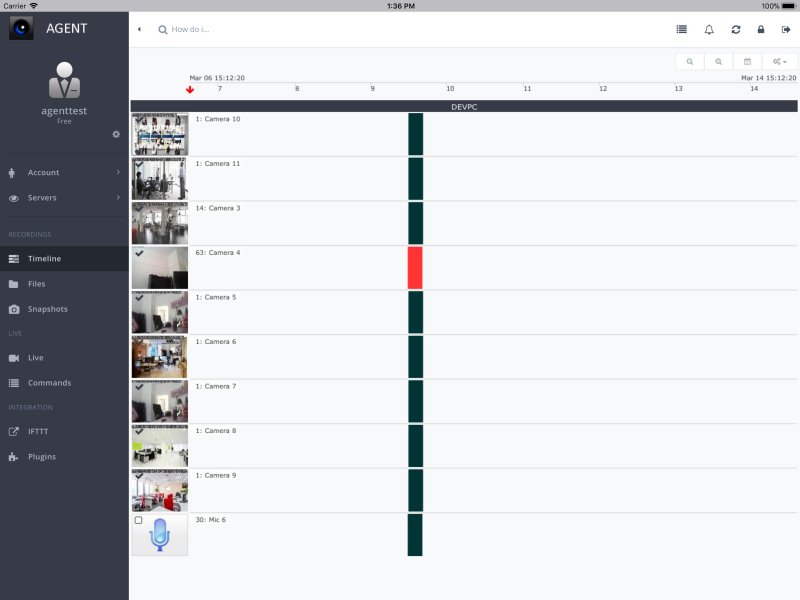
Agent DVR has released version 7.0.5.0, which is a comprehensive security camera software solution for PCs that operates across multiple platforms. Designed to function as a self-hosted DVR, Agent DVR allows users to transform their computers, network cameras, and USB webcams into a robust surveillance system. Unlike cloud-based solutions, it provides users with the freedom to manage and store their footage locally, alleviating concerns over privacy and recurring subscription fees.
Key Features:
- Versatile Compatibility: Agent DVR supports a variety of camera types, including USB webcams, ONVIF cameras, and Raspberry Pi modules. It can manage both local and remote recordings with easy access through any web browser without the need for complex port forwarding.
- AI-Powered Motion Detection: The software employs advanced motion detection technology that can distinguish between people, vehicles, and animals, significantly reducing false alerts. Users receive notifications through email, SMS, or push alerts, ensuring they are always informed.
- Flexible Recording Options: Users can choose from continuous recording, motion-triggered events, or scheduled recordings, allowing for tailored surveillance strategies.
- Smart Home Integration: Compatible with Home Assistant, MQTT, and IFTTT, Agent DVR can seamlessly integrate with other smart home systems, enhancing its functionality.
User Setup and Performance:
Getting started with Agent DVR is relatively straightforward, although users might require some technical knowledge for advanced configurations. The software is optimized for low power consumption and performs best on dedicated systems, especially when managing multiple HD camera streams with AI detection. It is available for Windows, Linux, macOS, and Raspberry Pi.
Pros and Cons:
- Pros:
- Free for personal use without mandatory subscriptions
- Supports various camera types with AI motion detection
- Flexible storage options for recordings
- Remote access without port forwarding
- Cons:
- Initial setup can be complex for beginners
- Requires a strong CPU for optimal AI performance
- Lacks a standalone mobile app—configuration is PC-based
Conclusion:
Agent DVR stands out as a powerful and privacy-centric surveillance solution, offering users complete control over their security systems without the need for cloud reliance. Its customizable features and flexible storage options make it an excellent choice for various applications, including home security, business monitoring, and even pet surveillance. For those seeking an affordable, comprehensive, and private security solution, Agent DVR is highly recommended.
Extension:
As technology advances, the demand for effective surveillance solutions becomes increasingly important. Agent DVR's ability to integrate with smart home technologies positions it well for the future, where interconnected devices can enhance security measures. Furthermore, potential future updates may include enhanced AI capabilities, user-friendly mobile applications, and improved cloud features for those who choose to utilize online storage. With the ongoing development in surveillance technology, Agent DVR remains a relevant and competitive option in the surveillance software market
Key Features:
- Versatile Compatibility: Agent DVR supports a variety of camera types, including USB webcams, ONVIF cameras, and Raspberry Pi modules. It can manage both local and remote recordings with easy access through any web browser without the need for complex port forwarding.
- AI-Powered Motion Detection: The software employs advanced motion detection technology that can distinguish between people, vehicles, and animals, significantly reducing false alerts. Users receive notifications through email, SMS, or push alerts, ensuring they are always informed.
- Flexible Recording Options: Users can choose from continuous recording, motion-triggered events, or scheduled recordings, allowing for tailored surveillance strategies.
- Smart Home Integration: Compatible with Home Assistant, MQTT, and IFTTT, Agent DVR can seamlessly integrate with other smart home systems, enhancing its functionality.
User Setup and Performance:
Getting started with Agent DVR is relatively straightforward, although users might require some technical knowledge for advanced configurations. The software is optimized for low power consumption and performs best on dedicated systems, especially when managing multiple HD camera streams with AI detection. It is available for Windows, Linux, macOS, and Raspberry Pi.
Pros and Cons:
- Pros:
- Free for personal use without mandatory subscriptions
- Supports various camera types with AI motion detection
- Flexible storage options for recordings
- Remote access without port forwarding
- Cons:
- Initial setup can be complex for beginners
- Requires a strong CPU for optimal AI performance
- Lacks a standalone mobile app—configuration is PC-based
Conclusion:
Agent DVR stands out as a powerful and privacy-centric surveillance solution, offering users complete control over their security systems without the need for cloud reliance. Its customizable features and flexible storage options make it an excellent choice for various applications, including home security, business monitoring, and even pet surveillance. For those seeking an affordable, comprehensive, and private security solution, Agent DVR is highly recommended.
Extension:
As technology advances, the demand for effective surveillance solutions becomes increasingly important. Agent DVR's ability to integrate with smart home technologies positions it well for the future, where interconnected devices can enhance security measures. Furthermore, potential future updates may include enhanced AI capabilities, user-friendly mobile applications, and improved cloud features for those who choose to utilize online storage. With the ongoing development in surveillance technology, Agent DVR remains a relevant and competitive option in the surveillance software market
Agent DVR 7.0.5.0 released
Agent DVR is a full DVR service-based solution for PCs (fully cross-platform). It detects movement and sound, records and streams from multiple video sources, including USB, IP cameras, Desktop, etc.