The recently released Advanced Mouse Manager 3.7 builds upon the popular Mouse Manager utility, specifically designed for enhancing mouse functionality by introducing application-based profiles and translation features. This utility allows users to reconfigure the often underutilized fourth and fifth buttons on their mice, enabling them to perform specific keyboard commands or macros.
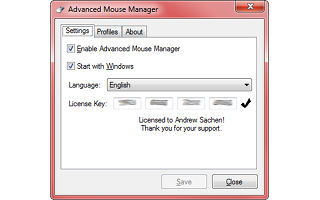
For instance, if a user assigns the sequence of letters "H, E, L, L, O" to the Fifth Button, pressing it will simulate typing "hello" on the keyboard. All custom commands are organized within profiles that can be easily accessed and activated via a convenient Tray icon. The interface is user-friendly, consisting of three main tabs: Settings, Profiles, and About.
The Settings tab allows for quick adjustments, such as enabling or disabling the Mouse Manager functionality and setting the program to start automatically with Windows. Users can toggle their preferred profile with just a click, making it simple to switch between different configurations based on their needs.
Beyond its basic features, Advanced Mouse Manager 3.7 could enhance productivity for users who frequently switch between applications, as it allows for tailored mouse functions that align with specific tasks. Future updates could potentially incorporate more advanced features, such as customizable gestures, additional button configurations, or integration with other productivity tools, further expanding the utility's capabilities and user base
For instance, if a user assigns the sequence of letters "H, E, L, L, O" to the Fifth Button, pressing it will simulate typing "hello" on the keyboard. All custom commands are organized within profiles that can be easily accessed and activated via a convenient Tray icon. The interface is user-friendly, consisting of three main tabs: Settings, Profiles, and About.
The Settings tab allows for quick adjustments, such as enabling or disabling the Mouse Manager functionality and setting the program to start automatically with Windows. Users can toggle their preferred profile with just a click, making it simple to switch between different configurations based on their needs.
Beyond its basic features, Advanced Mouse Manager 3.7 could enhance productivity for users who frequently switch between applications, as it allows for tailored mouse functions that align with specific tasks. Future updates could potentially incorporate more advanced features, such as customizable gestures, additional button configurations, or integration with other productivity tools, further expanding the utility's capabilities and user base
Advanced Mouse Manager 3.7 released
Advanced Mouse Manager is an offshoot of the popular Mouse Manager tray icon utility that adds application-based profiles and translations.