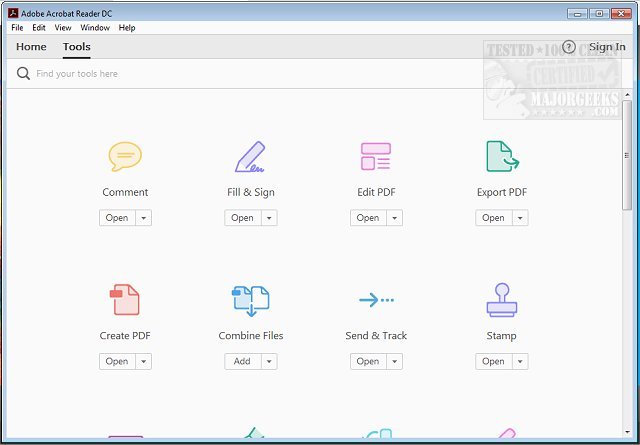
Adobe has released version 25.001.21367 of Adobe Acrobat Reader DC, an essential free software tool for viewing and printing PDF files. As PDFs are widely used in various aspects of life, from academic assignments to business contracts, Adobe Acrobat Reader DC serves as a versatile solution that simplifies the handling of these files.
Effortless Viewing and Navigation:
Opening PDFs is quick and easy with Acrobat Reader DC. Users can easily navigate through multi-page documents, jump to specific sections, and utilize the search functionality to locate specific terms, making it suitable for both detailed textbooks and simple menus.
Professional Annotation Tools:
The software offers a range of annotation features, allowing users to highlight, underline, and add sticky notes. It also includes a brush tool for drawing and text boxes for comments, ensuring that even those with limited tech skills can effectively communicate their thoughts.
Simple Digital Signatures:
Gone are the days of printing for signatures. The "Fill & Sign" feature enables users to electronically sign documents swiftly—ideal for contracts, permission slips, and more—without the need for physical paperwork.
Integration with Adobe Document Cloud:
Adobe Acrobat Reader DC supports seamless file syncing through Adobe Document Cloud. Users can access and edit PDFs across devices—starting on a desktop and finishing on a mobile device—eliminating the hassle of managing multiple file versions.
Optional Premium Features:
While the free version is robust, users can enhance their experience with a premium subscription that offers additional functionalities like PDF creation, conversion, merging, and advanced editing capabilities.
Robust Security Measures:
Adobe prioritizes user safety with its Protected Mode, which guards against potentially harmful files, making it a reliable choice for handling sensitive information.
Adobe Acrobat Reader DC is not merely a PDF viewer; it is a comprehensive tool that handles a variety of tasks efficiently. With its user-friendly features, cross-platform compatibility (Windows, macOS, iOS, Android, and web), and ongoing updates, it is a vital addition to anyone's software collection.
- Versatile functions for viewing, annotating, and signing PDFs.
- Secure and continually evolving to meet user needs.
If you're looking to enhance your PDF experience—whether for school, work, or personal use—Adobe Acrobat Reader DC is the software you didn't know you needed. Download it today and streamline your PDF interactions!
Related Topics:
- How to Create a PDF in Windows
- Understanding Adobe Acrobat Update Service (Adobe_Updater.exe
Key Features of Adobe Acrobat Reader DC
Effortless Viewing and Navigation:
Opening PDFs is quick and easy with Acrobat Reader DC. Users can easily navigate through multi-page documents, jump to specific sections, and utilize the search functionality to locate specific terms, making it suitable for both detailed textbooks and simple menus.
Professional Annotation Tools:
The software offers a range of annotation features, allowing users to highlight, underline, and add sticky notes. It also includes a brush tool for drawing and text boxes for comments, ensuring that even those with limited tech skills can effectively communicate their thoughts.
Simple Digital Signatures:
Gone are the days of printing for signatures. The "Fill & Sign" feature enables users to electronically sign documents swiftly—ideal for contracts, permission slips, and more—without the need for physical paperwork.
Integration with Adobe Document Cloud:
Adobe Acrobat Reader DC supports seamless file syncing through Adobe Document Cloud. Users can access and edit PDFs across devices—starting on a desktop and finishing on a mobile device—eliminating the hassle of managing multiple file versions.
Optional Premium Features:
While the free version is robust, users can enhance their experience with a premium subscription that offers additional functionalities like PDF creation, conversion, merging, and advanced editing capabilities.
Robust Security Measures:
Adobe prioritizes user safety with its Protected Mode, which guards against potentially harmful files, making it a reliable choice for handling sensitive information.
Conclusion
Adobe Acrobat Reader DC is not merely a PDF viewer; it is a comprehensive tool that handles a variety of tasks efficiently. With its user-friendly features, cross-platform compatibility (Windows, macOS, iOS, Android, and web), and ongoing updates, it is a vital addition to anyone's software collection.
Why You Should Download It:
- Completely free with optional premium upgrades.- Versatile functions for viewing, annotating, and signing PDFs.
- Secure and continually evolving to meet user needs.
If you're looking to enhance your PDF experience—whether for school, work, or personal use—Adobe Acrobat Reader DC is the software you didn't know you needed. Download it today and streamline your PDF interactions!
Related Topics:
- How to Create a PDF in Windows
- Understanding Adobe Acrobat Update Service (Adobe_Updater.exe
Adobe Acrobat Reader DC 25.001.21367 released
Adobe Acrobat Reader DC is free and freely distributable software that lets you view and print Portable Document Format (PDF) files.