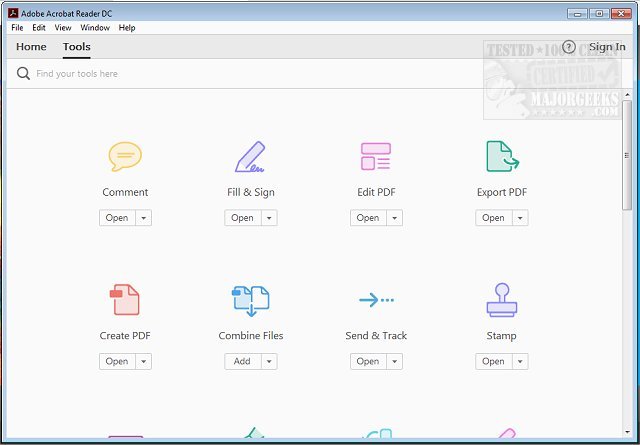
Adobe has recently released Adobe Acrobat Reader DC version 25.001.21265, a free and versatile software designed for viewing and printing PDF files. This application has become an essential tool for various users, from students needing to manage assignments to professionals requiring the ability to sign documents on the go.
Key Features of Adobe Acrobat Reader DC:
1. Effortless Viewing and Navigation: Users can open PDFs quickly and navigate through multi-page documents seamlessly. The built-in search feature allows users to locate specific terms, making it easy to manage complex documents.
2. Professional Annotation Tools: The software offers intuitive tools for highlighting, underlining, and adding sticky notes, as well as a brush tool for sketching directly on PDFs. This feature is particularly useful for collaboration and feedback.
3. Digital Signatures: The "Fill & Sign" feature allows users to e-sign documents quickly, eliminating the need for printing and scanning, thus streamlining the signing process for various forms.
4. Integration with Adobe Document Cloud: This feature enhances accessibility, allowing users to sync PDFs across multiple devices, ensuring that work can be continued seamlessly, whether on a computer, smartphone, or tablet.
5. Optional Premium Features: While the free version is robust, users can upgrade to access premium features such as PDF creation, conversion, merging, and advanced editing capabilities.
6. Robust Security Measures: Adobe Acrobat Reader DC includes a Protected Mode that safeguards users from potentially harmful files, ensuring a secure experience when handling confidential information.
Why You Should Download Adobe Acrobat Reader DC:
- It is completely free, with optional premium upgrades available.
- It is compatible with a wide range of operating systems, including Windows, macOS, iOS, Android, and web browsers.
- The application transforms PDFs into interactive documents, enhancing productivity through annotations and electronic signatures.
- Adobe continues to improve the software with regular updates, ensuring reliability and security.
Whether you're looking to review documents, fill out forms, or read ebooks, Adobe Acrobat Reader DC is an indispensable tool that simplifies PDF management. With its user-friendly interface and powerful features, it deserves a spot on your device.
Ready to enhance your PDF experience? Download Adobe Acrobat Reader DC today and discover how it can transform your document handling!
In addition, users may also explore resources related to creating PDFs in Windows or understanding Adobe's update services to maximize their experience with the software
Key Features of Adobe Acrobat Reader DC:
1. Effortless Viewing and Navigation: Users can open PDFs quickly and navigate through multi-page documents seamlessly. The built-in search feature allows users to locate specific terms, making it easy to manage complex documents.
2. Professional Annotation Tools: The software offers intuitive tools for highlighting, underlining, and adding sticky notes, as well as a brush tool for sketching directly on PDFs. This feature is particularly useful for collaboration and feedback.
3. Digital Signatures: The "Fill & Sign" feature allows users to e-sign documents quickly, eliminating the need for printing and scanning, thus streamlining the signing process for various forms.
4. Integration with Adobe Document Cloud: This feature enhances accessibility, allowing users to sync PDFs across multiple devices, ensuring that work can be continued seamlessly, whether on a computer, smartphone, or tablet.
5. Optional Premium Features: While the free version is robust, users can upgrade to access premium features such as PDF creation, conversion, merging, and advanced editing capabilities.
6. Robust Security Measures: Adobe Acrobat Reader DC includes a Protected Mode that safeguards users from potentially harmful files, ensuring a secure experience when handling confidential information.
Why You Should Download Adobe Acrobat Reader DC:
- It is completely free, with optional premium upgrades available.
- It is compatible with a wide range of operating systems, including Windows, macOS, iOS, Android, and web browsers.
- The application transforms PDFs into interactive documents, enhancing productivity through annotations and electronic signatures.
- Adobe continues to improve the software with regular updates, ensuring reliability and security.
Whether you're looking to review documents, fill out forms, or read ebooks, Adobe Acrobat Reader DC is an indispensable tool that simplifies PDF management. With its user-friendly interface and powerful features, it deserves a spot on your device.
Ready to enhance your PDF experience? Download Adobe Acrobat Reader DC today and discover how it can transform your document handling!
In addition, users may also explore resources related to creating PDFs in Windows or understanding Adobe's update services to maximize their experience with the software
Adobe Acrobat Reader DC 25.001.21265 released
Adobe Acrobat Reader DC is free and freely distributable software that lets you view and print Portable Document Format (PDF) files.