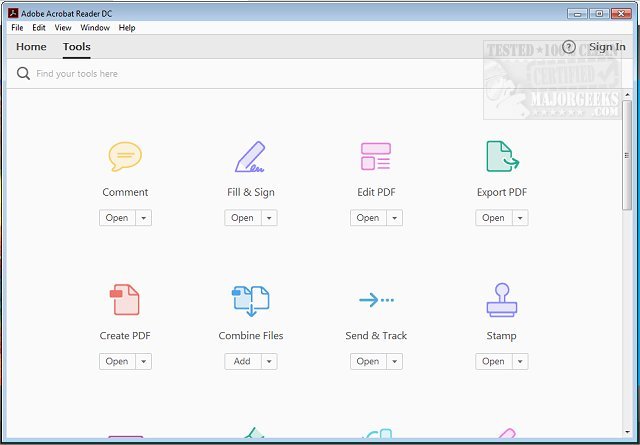
Adobe has recently released version 25.001.21111 of Adobe Acrobat Reader DC, a free application that enables users to view, print, and interact with Portable Document Format (PDF) files. This software is essential for anyone dealing with PDFs, whether for academic, professional, or personal use, as it provides a comprehensive suite of tools for managing these documents.
Why Choose Adobe Acrobat Reader DC?
1. Effortless Viewing and Navigation: The application allows for quick and easy access to PDF documents, enabling users to view multi-page files and search for specific terms without any complications. This feature is particularly beneficial for students and professionals who frequently handle documents with extensive content.
2. Advanced Annotation Tools: Users can enhance their PDFs using a variety of annotation features, including highlighting, underlining, and adding sticky notes. The intuitive tools cater to all tech skill levels, making it easy to add personalized comments or illustrations directly onto the document.
3. Convenient Digital Signatures: The "Fill & Sign" function allows users to electronically sign documents without the need for printing. This feature streamlines the signing process for contracts, forms, and confirmations.
4. Integration with Adobe Document Cloud: Acrobat Reader DC syncs seamlessly with Adobe Document Cloud, providing users with access to their documents across different devices. This integration facilitates smooth transitions between devices, allowing users to start on one device and finish on another without losing progress.
5. Optional Premium Features: While the free version is robust, users can opt for premium features that enhance their experience. This includes the ability to create new PDFs, convert PDFs to other formats, merge multiple PDFs, and perform advanced editing.
6. Robust Security Features: Adobe prioritizes user safety with its Protected Mode, which helps protect against potentially harmful files. This feature is crucial for users handling sensitive or confidential information.
In Conclusion: A Must-Have Tool
Adobe Acrobat Reader DC is more than just a basic PDF reader; it offers a comprehensive set of features that cater to a wide range of needs. From easy viewing and annotation to electronic signing and cloud integration, it is designed to simplify PDF management for everyone.
Why You Should Download It:
- Free to use with optional premium enhancements.
- Compatible with various operating systems including Windows, macOS, iOS, Android, and web browsers.
- Empowers users to create interactive documents with annotations and e-signatures.
- Regular updates ensure improved functionality and security.
For anyone looking to streamline their PDF-related tasks, Adobe Acrobat Reader DC is an invaluable tool worth downloading. Experience the ease of managing PDFs today by clicking the download link!
Additional Resources:
- Learn how to create a PDF in Windows.
- Understand the Adobe Acrobat Update Service (Adobe_Updater.exe).
With Adobe Acrobat Reader DC, take control of your PDF adventures and enhance your productivity
Why Choose Adobe Acrobat Reader DC?
1. Effortless Viewing and Navigation: The application allows for quick and easy access to PDF documents, enabling users to view multi-page files and search for specific terms without any complications. This feature is particularly beneficial for students and professionals who frequently handle documents with extensive content.
2. Advanced Annotation Tools: Users can enhance their PDFs using a variety of annotation features, including highlighting, underlining, and adding sticky notes. The intuitive tools cater to all tech skill levels, making it easy to add personalized comments or illustrations directly onto the document.
3. Convenient Digital Signatures: The "Fill & Sign" function allows users to electronically sign documents without the need for printing. This feature streamlines the signing process for contracts, forms, and confirmations.
4. Integration with Adobe Document Cloud: Acrobat Reader DC syncs seamlessly with Adobe Document Cloud, providing users with access to their documents across different devices. This integration facilitates smooth transitions between devices, allowing users to start on one device and finish on another without losing progress.
5. Optional Premium Features: While the free version is robust, users can opt for premium features that enhance their experience. This includes the ability to create new PDFs, convert PDFs to other formats, merge multiple PDFs, and perform advanced editing.
6. Robust Security Features: Adobe prioritizes user safety with its Protected Mode, which helps protect against potentially harmful files. This feature is crucial for users handling sensitive or confidential information.
In Conclusion: A Must-Have Tool
Adobe Acrobat Reader DC is more than just a basic PDF reader; it offers a comprehensive set of features that cater to a wide range of needs. From easy viewing and annotation to electronic signing and cloud integration, it is designed to simplify PDF management for everyone.
Why You Should Download It:
- Free to use with optional premium enhancements.
- Compatible with various operating systems including Windows, macOS, iOS, Android, and web browsers.
- Empowers users to create interactive documents with annotations and e-signatures.
- Regular updates ensure improved functionality and security.
For anyone looking to streamline their PDF-related tasks, Adobe Acrobat Reader DC is an invaluable tool worth downloading. Experience the ease of managing PDFs today by clicking the download link!
Additional Resources:
- Learn how to create a PDF in Windows.
- Understand the Adobe Acrobat Update Service (Adobe_Updater.exe).
With Adobe Acrobat Reader DC, take control of your PDF adventures and enhance your productivity
Adobe Acrobat Reader DC 25.001.21111 released
Adobe Acrobat Reader DC is free and freely distributable software that lets you view and print Portable Document Format (PDF) files.