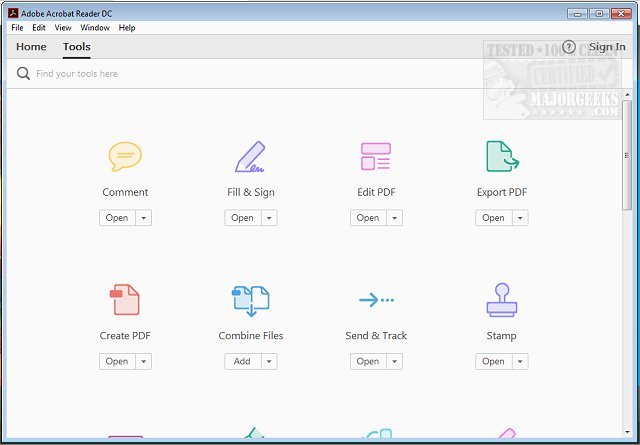
Adobe has recently released version 25.001.20982 of Adobe Acrobat Reader DC, a widely-used, free software designed for viewing and printing Portable Document Format (PDF) files. With PDFs being integral to various aspects of daily life—like schoolwork, business contracts, and digital tickets—Adobe Acrobat Reader DC serves as an essential tool for anyone dealing with these documents.
1. User-Friendly Viewing and Searching: The software allows users to effortlessly open and navigate multi-page PDFs. A built-in search function makes it easy to locate specific terms within documents.
2. Advanced Annotation Tools: Users can enhance their PDFs with features that let them highlight, underline, and add comments or sticky notes. There's even a brush tool for drawing or sketching directly on the document.
3. Convenient Digital Signatures: The "Fill & Sign" feature simplifies the process of signing documents electronically, making it possible to complete forms without the need for physical printing.
4. Integration with Adobe Document Cloud: This feature allows seamless access to PDFs from various devices—be it a computer, tablet, or smartphone. Users can start a task on one device and finish it on another without any hassle.
5. Optional Premium Features: For those seeking additional capabilities, a premium subscription provides options like creating new PDFs, converting existing ones into different formats, merging multiple files, and advanced editing tools.
6. Enhanced Security: Adobe Acrobat Reader DC prioritizes user safety with its Protected Mode, which guards against potentially harmful files, ensuring secure handling of sensitive information.
Adobe Acrobat Reader DC is more than just a basic PDF reader; it’s a multifunctional tool that simplifies various PDF-related tasks. Its combination of free and premium features, cross-platform compatibility, and ongoing updates make it a valuable application for students, professionals, and anyone else needing to manage PDF documents.
- Free to Use: The core functionalities are available at no cost, with optional premium upgrades for advanced features.
- Cross-Platform Availability: Accessible on Windows, macOS, iOS, Android, and web browsers.
- Interactive Document Capabilities: Enables the creation of interactive PDFs through annotations and electronic signatures.
- Continuous Improvement: Regular updates ensure the software stays current with user needs and security requirements.
In conclusion, Adobe Acrobat Reader DC is a must-have application for anyone working with PDF files. Its extensive features make it a powerful ally in managing documents efficiently. If you're ready to enhance your PDF experience, don't hesitate to download it today and explore its capabilities!
- Understand the Adobe Acrobat Update Service and its functionalities
Key Features of Adobe Acrobat Reader DC
1. User-Friendly Viewing and Searching: The software allows users to effortlessly open and navigate multi-page PDFs. A built-in search function makes it easy to locate specific terms within documents.
2. Advanced Annotation Tools: Users can enhance their PDFs with features that let them highlight, underline, and add comments or sticky notes. There's even a brush tool for drawing or sketching directly on the document.
3. Convenient Digital Signatures: The "Fill & Sign" feature simplifies the process of signing documents electronically, making it possible to complete forms without the need for physical printing.
4. Integration with Adobe Document Cloud: This feature allows seamless access to PDFs from various devices—be it a computer, tablet, or smartphone. Users can start a task on one device and finish it on another without any hassle.
5. Optional Premium Features: For those seeking additional capabilities, a premium subscription provides options like creating new PDFs, converting existing ones into different formats, merging multiple files, and advanced editing tools.
6. Enhanced Security: Adobe Acrobat Reader DC prioritizes user safety with its Protected Mode, which guards against potentially harmful files, ensuring secure handling of sensitive information.
The Verdict
Adobe Acrobat Reader DC is more than just a basic PDF reader; it’s a multifunctional tool that simplifies various PDF-related tasks. Its combination of free and premium features, cross-platform compatibility, and ongoing updates make it a valuable application for students, professionals, and anyone else needing to manage PDF documents.
Why You Should Download It
- Free to Use: The core functionalities are available at no cost, with optional premium upgrades for advanced features.
- Cross-Platform Availability: Accessible on Windows, macOS, iOS, Android, and web browsers.
- Interactive Document Capabilities: Enables the creation of interactive PDFs through annotations and electronic signatures.
- Continuous Improvement: Regular updates ensure the software stays current with user needs and security requirements.
In conclusion, Adobe Acrobat Reader DC is a must-have application for anyone working with PDF files. Its extensive features make it a powerful ally in managing documents efficiently. If you're ready to enhance your PDF experience, don't hesitate to download it today and explore its capabilities!
Further Exploration
- Learn how to create PDFs in Windows.- Understand the Adobe Acrobat Update Service and its functionalities
Adobe Acrobat Reader DC 25.001.20982 released
Adobe Acrobat Reader DC is free and freely distributable software that lets you view and print Portable Document Format (PDF) files.