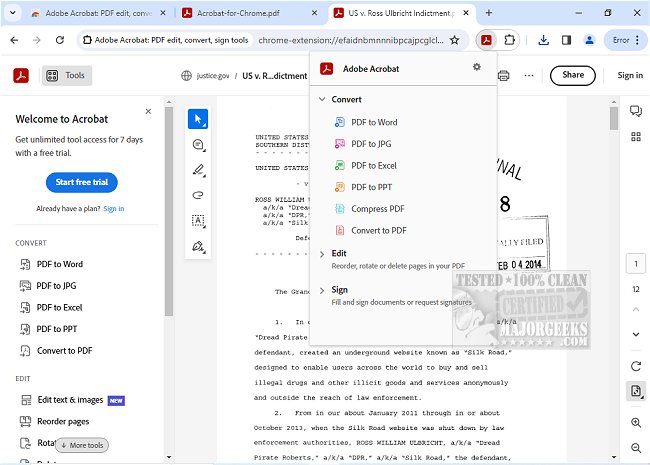
Adobe has released version 26.2.2.1 of Adobe Acrobat for Chrome, a powerful extension that brings a suite of PDF tools directly to your browser. With this tool, users can view, fill out, comment on, sign, convert, and compress PDFs, making it an essential resource for anyone who frequently works with PDF documents.
Adobe Acrobat is known for its robust PDF capabilities, and the Chrome extension enhances this experience by allowing users to perform a variety of tasks seamlessly while browsing. Users can add comments to PDFs through sticky notes, text highlights, and other annotations at no cost. For those requiring more advanced functionalities, the extension offers options to export to and from PDF, create new PDFs, merge multiple documents, organize existing PDFs, and reduce file sizes, among others.
Installation of Adobe Acrobat for Chrome is straightforward: simply install the extension, pin it for easy access, and open any PDF in your browser to utilize the tools. The PDF viewer is highly efficient, allowing for quick downloads or printing. Users can also sign in to access their files stored online, enabling retrieval from anywhere.
In addition to basic annotations, the extension allows users to edit PDFs by adding text and drawings. It integrates with Adobe Acrobat Reader for desktop use, enabling users to fill out and sign forms conveniently. E-signature capabilities are included, allowing users to sign documents digitally or with their initials.
Overall, Adobe Acrobat for Chrome simplifies PDF management and enhances productivity by providing direct access to various tools and premium features, making it a vital addition for users looking to streamline their workflow with PDF documents.
For those interested in learning more about PDF creation or the Adobe Acrobat Update Service, additional resources are available
Adobe Acrobat is known for its robust PDF capabilities, and the Chrome extension enhances this experience by allowing users to perform a variety of tasks seamlessly while browsing. Users can add comments to PDFs through sticky notes, text highlights, and other annotations at no cost. For those requiring more advanced functionalities, the extension offers options to export to and from PDF, create new PDFs, merge multiple documents, organize existing PDFs, and reduce file sizes, among others.
Installation of Adobe Acrobat for Chrome is straightforward: simply install the extension, pin it for easy access, and open any PDF in your browser to utilize the tools. The PDF viewer is highly efficient, allowing for quick downloads or printing. Users can also sign in to access their files stored online, enabling retrieval from anywhere.
In addition to basic annotations, the extension allows users to edit PDFs by adding text and drawings. It integrates with Adobe Acrobat Reader for desktop use, enabling users to fill out and sign forms conveniently. E-signature capabilities are included, allowing users to sign documents digitally or with their initials.
Overall, Adobe Acrobat for Chrome simplifies PDF management and enhances productivity by providing direct access to various tools and premium features, making it a vital addition for users looking to streamline their workflow with PDF documents.
For those interested in learning more about PDF creation or the Adobe Acrobat Update Service, additional resources are available
Adobe Acrobat for Chrome 26.2.2.1 released
Access Adobe Acrobat PDF tools in Chrome; view, fill, comment, sign, convert, and compress tools available.