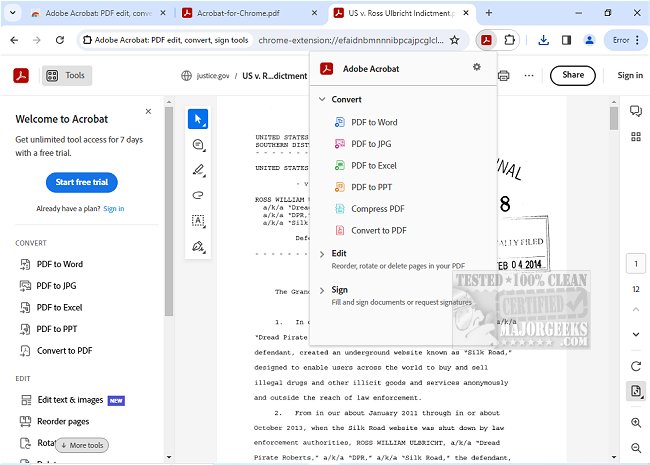
Adobe has released version 26.2.1.1 of Adobe Acrobat for Chrome, enhancing users' ability to interact with PDF documents directly within the browser. This extension offers a comprehensive suite of tools that enable users to view, fill out, comment on, sign, convert, and compress PDF files seamlessly while browsing.
With Adobe Acrobat for Chrome, users can enhance their PDF experience by adding comments, sticky notes, highlights, and more—all at no cost. For those who require advanced functionalities, the extension provides options to export to and from PDF, create new PDFs, merge existing documents, organize content, and reduce file sizes. The installation process is straightforward: simply add the extension, pin it for easy access, and open any PDF to utilize the desired Acrobat tools.
The benefits of using Adobe Acrobat for Chrome include the ability to download or print documents with a single click, store files online for easy retrieval, and manage PDFs with a user-friendly interface. Users can annotate PDFs by adding notes and drawings, and the extension also supports completing forms using the Acrobat form filler. E-signing documents is made simple, allowing users to add their signature or initials to any PDF.
This update not only streamlines PDF management but also integrates various Adobe Acrobat tools, providing a smooth and efficient workflow for users. Overall, Adobe Acrobat for Chrome represents a significant enhancement for anyone needing to handle PDF documents effectively while browsing the web.
In addition to these features, future updates may include enhanced collaboration tools, improved integration with other Adobe services, and additional customization options to further tailor the PDF workflow to individual user needs. Users can look forward to ongoing improvements that will make managing PDFs even more intuitive and efficient
With Adobe Acrobat for Chrome, users can enhance their PDF experience by adding comments, sticky notes, highlights, and more—all at no cost. For those who require advanced functionalities, the extension provides options to export to and from PDF, create new PDFs, merge existing documents, organize content, and reduce file sizes. The installation process is straightforward: simply add the extension, pin it for easy access, and open any PDF to utilize the desired Acrobat tools.
The benefits of using Adobe Acrobat for Chrome include the ability to download or print documents with a single click, store files online for easy retrieval, and manage PDFs with a user-friendly interface. Users can annotate PDFs by adding notes and drawings, and the extension also supports completing forms using the Acrobat form filler. E-signing documents is made simple, allowing users to add their signature or initials to any PDF.
This update not only streamlines PDF management but also integrates various Adobe Acrobat tools, providing a smooth and efficient workflow for users. Overall, Adobe Acrobat for Chrome represents a significant enhancement for anyone needing to handle PDF documents effectively while browsing the web.
In addition to these features, future updates may include enhanced collaboration tools, improved integration with other Adobe services, and additional customization options to further tailor the PDF workflow to individual user needs. Users can look forward to ongoing improvements that will make managing PDFs even more intuitive and efficient
Adobe Acrobat for Chrome 26.2.1.1 released
Access Adobe Acrobat PDF tools in Chrome; view, fill, comment, sign, convert, and compress tools available.