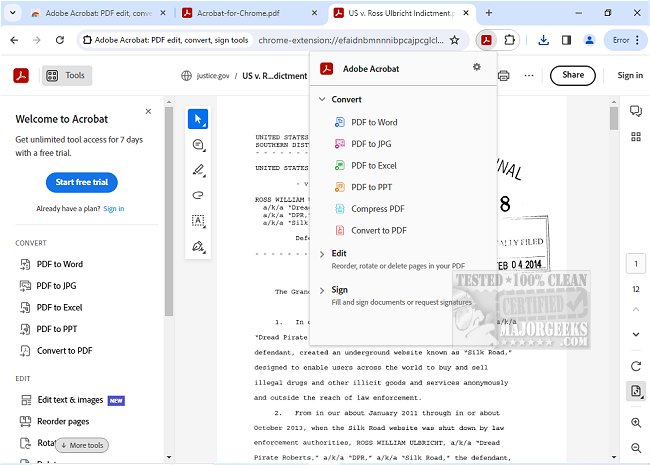
Adobe has released version 26.1.2.1 of Adobe Acrobat for Chrome, enhancing user access to a comprehensive suite of PDF tools directly within the browser. This extension allows users to view, fill, comment, sign, convert, and compress PDF documents efficiently while browsing.
Adobe Acrobat is a leading solution for managing PDFs, offering a user-friendly experience that caters to both casual and professional needs. With the integration into Google Chrome, users can easily add comments—such as sticky notes, text highlights, and more—at no cost. For those requiring advanced functionalities, the extension provides options to export documents to and from PDF, create new PDFs, merge multiple documents, organize existing PDFs, and reduce file sizes.
To get started with Adobe Acrobat for Chrome, users simply need to install the extension, pin it for easy access, and open any PDF file in their browser. From there, they can quickly utilize the desired tools, enhancing their PDF reading and editing experience. Key features include the ability to download or print documents, store files online for easy retrieval, and add notes or drawings directly onto PDF pages.
Additionally, the extension allows users to open PDFs in Adobe Acrobat Reader for filling and signing forms on their desktops. The Acrobat form filler feature simplifies the process of completing forms, while e-signature capabilities enable users to sign documents with their signatures or initials seamlessly.
Overall, Adobe Acrobat for Chrome streamlines PDF management tasks, providing users with quick access to essential features and premium tools that enhance productivity and workflow efficiency. This tool is particularly beneficial for professionals who need to handle PDFs regularly, making it a vital addition to any digital toolkit.
For further resources, users may explore guides on creating PDFs in Windows or inquire about Adobe's update services
Adobe Acrobat is a leading solution for managing PDFs, offering a user-friendly experience that caters to both casual and professional needs. With the integration into Google Chrome, users can easily add comments—such as sticky notes, text highlights, and more—at no cost. For those requiring advanced functionalities, the extension provides options to export documents to and from PDF, create new PDFs, merge multiple documents, organize existing PDFs, and reduce file sizes.
To get started with Adobe Acrobat for Chrome, users simply need to install the extension, pin it for easy access, and open any PDF file in their browser. From there, they can quickly utilize the desired tools, enhancing their PDF reading and editing experience. Key features include the ability to download or print documents, store files online for easy retrieval, and add notes or drawings directly onto PDF pages.
Additionally, the extension allows users to open PDFs in Adobe Acrobat Reader for filling and signing forms on their desktops. The Acrobat form filler feature simplifies the process of completing forms, while e-signature capabilities enable users to sign documents with their signatures or initials seamlessly.
Overall, Adobe Acrobat for Chrome streamlines PDF management tasks, providing users with quick access to essential features and premium tools that enhance productivity and workflow efficiency. This tool is particularly beneficial for professionals who need to handle PDFs regularly, making it a vital addition to any digital toolkit.
For further resources, users may explore guides on creating PDFs in Windows or inquire about Adobe's update services
Adobe Acrobat for Chrome 26.1.2.1 released
Access Adobe Acrobat PDF tools in Chrome; view, fill, comment, sign, convert, and compress tools available.