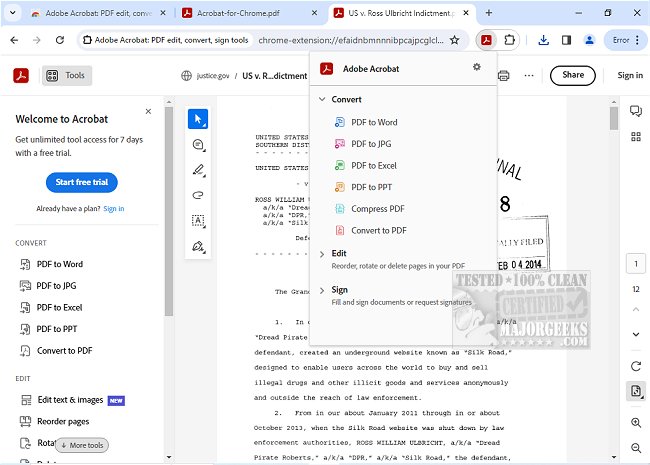
Adobe has released version 25.12.1.3 of Adobe Acrobat for Chrome, enhancing the way users can interact with PDF documents directly within their browser. This extension allows users to access a suite of tools designed to improve productivity when working with PDFs. Key features include the ability to view, fill, comment on, sign, convert, and compress PDF files.
Adobe Acrobat is a popular solution for managing PDFs, and its integration with Google Chrome offers a streamlined experience for users. With this extension, you can effortlessly add comments, such as sticky notes, text highlights, and other annotations at no cost. For users seeking advanced functionalities, the toolset includes options for exporting to and from PDF, creating new PDFs, merging multiple documents, organizing pages, and reducing file sizes.
To use Adobe Acrobat for Chrome, you simply need to install the extension, pin it for easy access, open any PDF file in your Chrome browser, and select the desired tool. This integration ensures a superior PDF viewing experience through the Acrobat reader, allowing for quick downloads and printing. Users can also sign in to store documents online, enabling access to files from any location.
In addition to basic editing and annotation, Adobe Acrobat for Chrome supports more sophisticated tasks. Users can fill out forms directly in the browser or open PDFs in Adobe Acrobat Reader on their desktops for a more comprehensive editing experience. The form filler feature simplifies completing PDF forms, and users can electronically sign documents using their signatures or initials.
Overall, Adobe Acrobat for Chrome presents a user-friendly solution for anyone needing to work with PDFs, providing quick access to essential tools and premium features that enhance workflow efficiency.
For more information, you might also explore topics like how to create a PDF in Windows or the role of the Adobe Acrobat Update Service (Adobe_Updater.exe)
Adobe Acrobat is a popular solution for managing PDFs, and its integration with Google Chrome offers a streamlined experience for users. With this extension, you can effortlessly add comments, such as sticky notes, text highlights, and other annotations at no cost. For users seeking advanced functionalities, the toolset includes options for exporting to and from PDF, creating new PDFs, merging multiple documents, organizing pages, and reducing file sizes.
To use Adobe Acrobat for Chrome, you simply need to install the extension, pin it for easy access, open any PDF file in your Chrome browser, and select the desired tool. This integration ensures a superior PDF viewing experience through the Acrobat reader, allowing for quick downloads and printing. Users can also sign in to store documents online, enabling access to files from any location.
In addition to basic editing and annotation, Adobe Acrobat for Chrome supports more sophisticated tasks. Users can fill out forms directly in the browser or open PDFs in Adobe Acrobat Reader on their desktops for a more comprehensive editing experience. The form filler feature simplifies completing PDF forms, and users can electronically sign documents using their signatures or initials.
Overall, Adobe Acrobat for Chrome presents a user-friendly solution for anyone needing to work with PDFs, providing quick access to essential tools and premium features that enhance workflow efficiency.
For more information, you might also explore topics like how to create a PDF in Windows or the role of the Adobe Acrobat Update Service (Adobe_Updater.exe)
Adobe Acrobat for Chrome 25.12.1.3 released
Access Adobe Acrobat PDF tools in Chrome; view, fill, comment, sign, convert, and compress tools available.