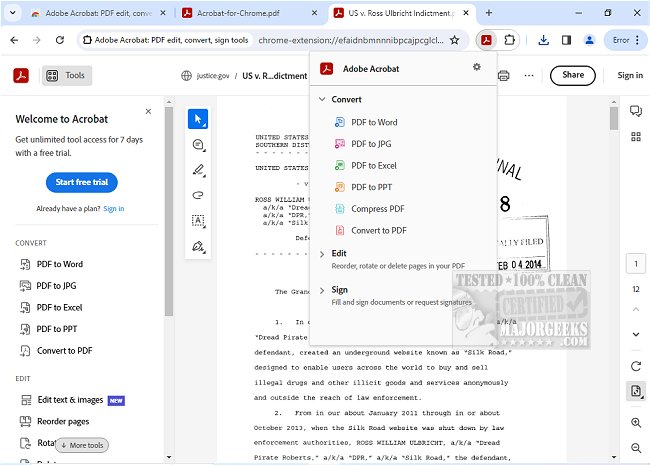
Adobe has released version 25.12.1.1 of Adobe Acrobat for Chrome, enabling users to easily access a variety of PDF tools directly within their browser. This extension allows for a more efficient PDF viewing experience, making it easier to view, fill, comment, sign, convert, and compress PDF files while browsing.
The Adobe Acrobat extension in Chrome is designed to enhance productivity by providing users with essential features for working with PDFs. Users can add comments, sticky notes, and highlights for free, significantly improving collaboration on documents. For those requiring more advanced capabilities, the extension includes options to export to and from PDF, create new PDFs, merge multiple documents, organize existing PDFs, and reduce file sizes.
To get started with Adobe Acrobat for Chrome, users simply need to install the extension and pin it for easy access. They can open any PDF in their browser and select the desired tool to begin working. The interface is user-friendly, allowing for quick downloading or printing of documents, and files can be stored online for convenient access from any location.
In addition to basic features, users can write on PDFs, fill out forms using the Acrobat form filler, and electronically sign documents with their signature or initials. The extension provides a streamlined way to manage PDFs, making it suitable for both casual users and professionals.
Overall, Adobe Acrobat for Chrome is a powerful tool that integrates seamlessly into the browsing experience, allowing users to work with PDFs more effectively than ever before. With its comprehensive set of features and easy accessibility, it enhances workflow and productivity for anyone who frequently handles PDF documents.
For those interested in maximizing their PDF capabilities, exploring related topics such as creating PDFs in Windows or understanding the Adobe Acrobat Update Service can provide additional insights and resources
The Adobe Acrobat extension in Chrome is designed to enhance productivity by providing users with essential features for working with PDFs. Users can add comments, sticky notes, and highlights for free, significantly improving collaboration on documents. For those requiring more advanced capabilities, the extension includes options to export to and from PDF, create new PDFs, merge multiple documents, organize existing PDFs, and reduce file sizes.
To get started with Adobe Acrobat for Chrome, users simply need to install the extension and pin it for easy access. They can open any PDF in their browser and select the desired tool to begin working. The interface is user-friendly, allowing for quick downloading or printing of documents, and files can be stored online for convenient access from any location.
In addition to basic features, users can write on PDFs, fill out forms using the Acrobat form filler, and electronically sign documents with their signature or initials. The extension provides a streamlined way to manage PDFs, making it suitable for both casual users and professionals.
Overall, Adobe Acrobat for Chrome is a powerful tool that integrates seamlessly into the browsing experience, allowing users to work with PDFs more effectively than ever before. With its comprehensive set of features and easy accessibility, it enhances workflow and productivity for anyone who frequently handles PDF documents.
For those interested in maximizing their PDF capabilities, exploring related topics such as creating PDFs in Windows or understanding the Adobe Acrobat Update Service can provide additional insights and resources
Adobe Acrobat for Chrome 25.12.1.1 released
Access Adobe Acrobat PDF tools in Chrome; view, fill, comment, sign, convert, and compress tools available.